Showing posts with label xkb. Show all posts

Monday, August 11, 2025

xkeyboard-config 2.45 has a new install location

This is a heads ups that if you install xkeyboard-config 2.45 (the package that provides the XKB data files), some manual interaction may be needed. Version 2.45 has changed the install location after over 20 years to be a) more correct and b) more flexible.

When you select a keyboard layout like "fr" or "de" (or any other ones really), what typically happens in the background is that an XKB parser (xkbcomp if you're on X, libxkbcommon if you're on Wayland) goes off and parses the data files provided by xkeyboard-config to populate the layouts. For historical reasons these data files have resided in /usr/share/X11/xkb and that directory is hardcoded in more places than it should be (i.e. more than zero). As of xkeyboard-config 2.45 however, the data files are now installed in the much more sensible directory /usr/share/xkeyboard-config-2 with a matching xkeyboard-config-2.pc for anyone who relies on the data files. The old location is symlinked to the new location so everything keeps working, people are happy, no hatemail needs to be written, etc. Good times.

The reason for this change is two-fold: moving it to a package-specific directory opens up the (admittedly mostly theoretical) use-case of some other package providing XKB data files. But even more so, it finally allows us to start versioning the data files and introduce new formats that may be backwards-incompatible for current parsers. This is not yet the case however, the current format in the new location is guaranteed to be the same as the format we've always had, it's really just a location change in preparation for future changes.

Now, from an upstream perspective this is not just hunky, it's also dory. Distributions however struggle a bit more with this change because of packaging format restrictions. RPM for example is quite unhappy with a directory being replaced by a symlink which means that Fedora and OpenSuSE have to resort to the .rpmmoved hack. If you have ever used the custom layout and/or added other files to the XKB data files you will need to manually move those files from /usr/share/X11/xkb.rpmmoved/ to the new equivalent location. If you have never used that layout and/or modified local you can just delete /usr/share/X11/xkb.rpmmoved. Of course, if you're on Wayland you shouldn't need to modify system directories anyway since you can do it in your $HOME.

Corresponding issues on what to do on Arch and Gentoo, I'm not immediately aware of other distributions's issues but if you search for them in your bugtracker you'll find them.

Thursday, February 18, 2021

A pre-supplied "custom" keyboard layout for X11

Last year I wrote about how to create a user-specific XKB layout, followed by a post explaining that this won't work in X. But there's a pandemic going on, which is presumably the only reason people haven't all switched to Wayland yet. So it was time to figure out a workaround for those still running X.

This Merge Request (scheduled for xkeyboard-config 2.33) adds a "custom" layout to the evdev.xml and base.xml files. These XML files are parsed by the various GUI tools to display the selection of available layouts. An entry in there will thus show up in the GUI tool.

Our rulesets, i.e. the files that convert a layout/variant configuration into the components to actually load already have wildcard matching [1]. So the custom layout will resolve to the symbols/custom file in your XKB data dir - usually /usr/share/X11/xkb/symbols/custom.

This file is not provided by xkeyboard-config. It can be created by the user though and whatever configuration is in there will be the "custom" keyboard layout. Because xkeyboard-config does not supply this file, it will not get overwritten on update.

From XKB's POV it is just another layout and it thus uses the same syntax. For example, to override the +/* key on the German keyboard layout with a key that produces a/b/c/d on the various Shift/Alt combinations, use this:

default
xkb_symbols "basic" {
    include "de(basic)"
    key <AD12>  { [      a,   b,   c,  d ]      };
};
This example includes the "basic" section from the symbols/de file (i.e. the default German layout), then overrides the 12th alphanumeric key from left in the 4th row from bottom (D) with the given symbols. I'll leave it up to the reader to come up with a less useful example.

There are a few drawbacks:

  • If the file is missing and the user selects the custom layout, the results are... undefined. For run-time configuration like GNOME it doesn't really matter - the layout compilation fails and you end up with the one the device already had (i.e. the default one built into X, usually the US layout).
  • If the file is missing and the custom layout is selected in the xorg.conf, the results are... undefined. I tested it and ended up with the US layout but that seems more by accident than design. My recommendation is to not do that.
  • No variants are available in the XML files, so the only accessible section is the one marked default.
  • If a commandline tool uses a variant of custom, the GUI will not reflect this. If the GUI goes boom, that's a bug in the GUI.

So overall, it's a hack[2]. But it's a hack that fixes real user issues and given we're talking about X, I doubt anyone notices another hack anyway.

[1] If you don't care about GUIs, setxkbmap -layout custom -variant foobar has been possible for years.
[2] Sticking with the UNIX principle, it's a hack that fixes the issue at hand, is badly integrated, and weird to configure.

Friday, January 22, 2021

Auto-updating XKB for new kernel keycodes

Your XKB keymap contains two important parts. One is the mapping from the hardware scancode to some internal representation, for example:

  <AB10> = 61;  

Which basically means Alphanumeric key in row B (from bottom), 10th key from the left. In other words: the /? key on a US keyboard.

The second part is mapping that internal representation to a keysym, for example:

  key <AB10> {        [     slash,    question        ]       }; 

This is the actual layout mapping - once in place this key really produces a slash or question mark (on level2, i.e. when Shift is down).

This two-part approach exists so either part can be swapped without affecting the other. Swap the second part to an exclamation mark and paragraph symbol and you have the French version of this key, swap it to dash/underscore and you have the German version of the key - all without having to change the keycode.

Back in the golden days of everyone-does-what-they-feel-like, keyboard manufacturers (presumably happily so) changed the key codes and we needed model-specific keycodes in XKB. The XkbModel configuration is a leftover from these trying times.

The Linux kernel's evdev API has largely done away with this. It provides a standardised set of keycodes, defined in linux/input-event-codes.h, and ensures, with the help of udev [0], that all keyboards actually conform to that. An evdev XKB keycode is a simple "kernel keycode + 8" [1] and that applies to all keyboards. On top of that, the kernel uses semantic definitions for the keys as they'd be in the US layout. KEY_Q is the key that would, behold!, produce a Q. Or an A in the French layout because they just have to be different, don't they? Either way, with evdev the Xkb Model configuration largely points to nothing and only wastes a few cycles with string parsing.

The second part, the keysym mapping, uses two approaches. One is to use a named #define like the "slash", "question" outlined above (see X11/keysymdef.h for the defines). The other is to use unicode directly like this example from  the Devangari layout:

  key <AB10> { [ U092f, U095f, slash, question ] };

As you can see, mix and match is available too. Using Unicode code points of course makes the layouts less immediately readable but on the other hand we don't need to #define the whole of Unicode. So from a maintenance perspective it's a win.

However, there's a third type of key that we care about: functional keys. Those are the multimedia (historically: "internet") keys that most devices have these days. Volume up, touchpad on/off, cycle display connectors, etc. Those keys are special in that they don't have a Unicode representation and they are always mapped to the same fixed functionality. Even Dvorak users want their volume keys to do what it says on the key.

Because they have no Unicode code points, those keys are defined, historically, in XF86keysyms.h:

  #define XF86XK_MonBrightnessUp    0x1008FF02  /* Monitor/panel brightness */

And mapping a key like this looks like this [2]:

  key <I21>   {       [ XF86Calculator        ] };

The only drawback: every key needs to be added manually. This has been done for some, but not for others. And some keys were added with different names than what the kernel uses [3].

So we're in this weird situation where we have a flexible keymap system  but the kernel already tells us what a key does anyway and we don't want to change that. Virtually all keys added in the last decade or so falls into that group of keys, but to actually make use of them requires a #define in xorgproto and an update to the keycodes and symbols in xkeyboard-config. That again introduces discrepancies and we end up in the situation where we're at right now: some keys don't work until someone files a bug, and then the users still need to wait for several components to be released and those releases trickle into the distributions.

10 years ago would've been a good time to make this more efficient. The situation wasn't that urgent then, most of the kernel keycodes added are >255 which means they cannot be used in X anyway. [4] The second best time to do it is now. What we need is basically a pass-through from kernel code to symbol and that's currently sitting in various MRs:

- xkeyboard-config can generate the keycodes/evdev file based on the list of kernel keycodes, so all kernel keycodes are mapped to internal representations by default

- xorgproto has reserved a range within the XF86 keysym reserved range for pass-through mappings, i.e. any KEY_FOO define from the kernel is mapped to XF86XK_Foo with a specific value [5]. The #define format is fixed so it can be parsed.

- xkeyboard-config parses theses XF86 keysyms and sets up a keysym mapping in the default keymap.

This is semi-automatic, i.e. there are helper scripts that detect changes and notify us, hooked into the CI, but the actual work must be done manually. These keysyms immediately become set-in-stone API so we don't want some unsupervised script to go wild on them.

There's a huge backlog of keys to be added (dating to kernels pre-v3.18) and I'll go through them one-by-one over the next weeks to make sure they're correct. But eventually they'll be done and we have a full keymap for all kernel keys to be immediately available in the XKB layout.

The last part of all of this is a calendar reminder for me to do this after every new kernel release. Let's hope this crucial part isn't the first to fail.

[0] 60-keyboard.hwdb has a mere ~1800 lines!
[1] Historical reasons, you don't want to know. *jedi wave*
[2] the XK_ part of the key name is dropped, implementation detail.
[3] This can also happen when a kernel define is renamed/aliased but we cannot easily do so for this header.
[4] X has an 8 bit keycode limit and that won't change until someone develops XKB2 with support for 32-bit keycodes, i.e. never.

[5] The actual value is an implementation detail and no client must care


Friday, September 4, 2020

No user-specific XKB configuration in X

This is the continuation from these posts: part 1, part 2, part 3 and part 4.

In the posts linked above, I describe how it's possible to have custom keyboard layouts in $HOME or /etc/xkb that will get picked up by libxkbcommon. This only works for the Wayland stack, the X stack doesn't use libxkbcommon. In this post I'll explain why it's unlikely this will ever happen in X.

As described in the previous posts, users configure with rules, models, layouts, variants and options (RMLVO). What XKB uses internally though are keycodes, compat, geometry, symbols types (KcCGST) [1].

There are, effectively, two KcCGST keymap compilers: libxkbcommon and xkbcomp. libxkbcommon can go from RMLVO to a full keymap, xkbcomp relies on other tools (e.g. setxkbmap) which in turn use a utility library called libxkbfile to can parse rules files. The X server has a copy of the libxkbfile code. It doesn't use libxkbfile itself but it relies on the header files provided by it for some structs.

Wayland's keyboard configuration works like this:

  • the compositor decides on the RMLVO keybard layout, through an out-of-band channel (e.g. gsettings, weston.ini, etc.)
  • the compositor invokes libxkbcommon to generate a KcCGST keymap and passes that full keymap to the client
  • the client compiles that keymap with libxkbcommon and feeds any key events into libxkbcommon's state tracker to get the right keysyms
The advantage we have here is that only the full keymap is passed between entities. Changing how that keymap is generated does not affect the client. This, coincidentally [2], is also how Xwayland gets the keymap passed to it and why Xwayland works with user-specific layouts.

X works differently. Notably, KcCGST can come in two forms, the partial form specifying names only and the full keymap. The partial form looks like this:

$ setxkbmap -print -layout fr -variant azerty -option ctrl:nocaps
xkb_keymap {
 xkb_keycodes  { include "evdev+aliases(azerty)" };
 xkb_types     { include "complete" };
 xkb_compat    { include "complete" };
 xkb_symbols   { include "pc+fr(azerty)+inet(evdev)+ctrl(nocaps)" };
 xkb_geometry  { include "pc(pc105)" };
};
This defines the component names but not the actual keymap, punting that to the next part in the stack. This will turn out to be the achilles heel. Keymap handling in the server has two distinct aproaches:
  • During keyboard device init, the input driver passes RMLVO to the server, based on defaults or xorg.conf options
  • The server has its own rules file parser and creates the KcCGST component names (as above)
  • The server forks off xkbcomp and passes the component names to stdin
  • xkbcomp generates a keymap based on the components and writes it out as XKM file format
  • the server reads in the XKM format and updates its internal structs
This has been the approach for decades. To give you an indication of how fast-moving this part of the server is: XKM caching was the latest feature added... in 2009.

Driver initialisation is nice, but barely used these days. You set your keyboard layout in e.g. GNOME or KDE and that will apply it in the running session. Or run setxkbmap, for those with a higher affinity to neckbeards. setxkbmap works like this:

  • setkxkbmap parses the rules file to convert RMLVO to KcCGST component names
  • setkxkbmap calls XkbGetKeyboardByName and hands those component names to the server
  • The server forks off xkbcomp and passes the component names to stdin
  • xkbcomp generates a keymap based on the components and writes it out as XKM file format
  • the server reads in the XKM format and updates its internal structs
Notably, the RMLVO to KcCGST conversion is done on the client side, not the server side. And the only way to send a keymap to the server is that XkbGetKeyboardByName request - which only takes KcCGST, you can't even pass it a full keymap. This is also a long-standing potential issue with XKB: if your client tools uses different XKB data files than the server, you don't get the keymap you expected.

Other parts of the stack do basically the same as setxkbmap which is just a thin wrapper around libxkbfile anyway.

Now, you can use xkbcomp on the client side to generate a keymap, but you can't hand it as-is to the server. xkbcomp can do this (using libxkbfile) by updating the XKB state one-by-one (XkbSetMap, XkbSetCompatMap, XkbSetNames, etc.). But at this point you're at the stage where you ask the server to knowingly compile a wrong keymap before updating the parts of it.

So, realistically, the only way to get user-specific XKB layouts into the X server would require updating libxkbfile to provide the same behavior as libxkbcommon, update the server to actually use libxkbfile instead of its own copy, and updating xkbcomp to support the changes in part 2, part 3. All while ensuring no regressions in code that's decades old, barely maintained, has no tests, and, let's be honest, not particularly pretty to look at. User-specific XKB layouts are somewhat a niche case to begin with, so I don't expect anyone to ever volunteer and do this work [3], much less find the resources to review and merge that code. The X server is unlikely to see another real release and this is definitely not something you want to sneak in in a minor update.

The other option would be to extend XKB-the-protocol with a request to take a full keymap so the server. Given the inertia involved and that the server won't see more full releases, this is not going to happen.

So as a summary: if you want custom keymaps on your machine, switch to Wayland (and/or fix any remaining issues preventing you from doing so) instead of hoping this will ever work on X. xmodmap will remain your only solution for X.

[1] Geometry is so pointless that libxkbcommon doesn't even implement this. It is a complex format to allow rendering a picture of your keyboard but it'd be a per-model thing and with evdev everyone is using the same model, so ...
[2] totally not coincidental btw
[3] libxkbcommon has been around for a decade now and no-one has volunteered to do this in the years since, so...

Tuesday, September 1, 2020

User-specific XKB configuration - putting it all together

This is the continuation from these posts: part 1, part 2, part 3

This is the part where it all comes together, with (BYO) fireworks and confetti, champagne and hoorays. Or rather, this is where I'll describe how to actually set everything up. It's a bit complicated because while libxkbcommon does the parsing legwork now, we haven't actually changed other APIs and the file formats which are still 1990s-style nerd cool and requires significant experience in CS [1] to understand what goes where.

The below relies on software using libxkbcommon and libxkbregistry. At the time of writing, libxkbcommon is used by all mainstream Wayland compositors but not by the X server. libxkbregistry is not yet used because I'm typing this before we had a release for it. But at least now I have a link to point people to.

libxkbcommon has a xkbcli-scaffold-new-layout tool that The xkblayout tool creates the template files as shown below. At the time of writing, this tool must be run from the git repo build directory, it is not installed.

I'll explain here how to add the us(banana) variant and the custom:foo option, and I will optimise for simplicity and brevity.

Directory structure

First, create the following directory layout:

$ tree $XDG_CONFIG_HOME/xkb
/home/user/.config/xkb
├── compat
├── keycodes
├── rules
│   ├── evdev
│   └── evdev.xml
├── symbols
│   ├── custom
│   └── us
└── types
If $XDG_CONFIG_HOME is unset, fall back to $HOME/.config.

Rules files

Create the rules file and add an entry to map our custom:foo option to a section in the symbols/custom file.

$ cat $XDG_CONFIG_HOME/xkb/rules/evdev
! option = symbols
  custom:foo = +custom(foo)

// Include the system 'evdev' file
! include %S/evdev
Note that no entry is needed for the variant, that is handled by wildcards in the system rules file. If you only want a variant and no options, you technically don't need this rules file.

Second, create the xml file used by libxkbregistry to display your new entries in the configuration GUIs:

$ cat $XDG_CONFIG_HOME/xkb/rules/evdev.xml
<?xml version="1.0" encoding="UTF-8"?>
<!DOCTYPE xkbConfigRegistry SYSTEM "xkb.dtd">
<xkbConfigRegistry version="1.1">
  <layoutList>
    <layout>
      <configItem>
        <name>us</name>
      </configItem>
      <variantList>
        <variant>
          <configItem>
            <name>banana</name>
            <shortDescription>banana</shortDescription>
            <description>US(Banana)</description>
          </configItem>
        </variant>
      </variantList>
    </layout>
  </layoutList>
  <optionList>
    <group allowMultipleSelection="true">
      <configItem>
        <name>custom</name>
        <description>custom options</description>
      </configItem>
      <option>
        <configItem>
          <name>custom:foo</name>
          <description>This option does something great</description>
        </configItem>
      </option>
    </group>
  </optionList>
</xkbConfigRegistry>
Our variant needs to be added as a layoutList/layout/variantList/variant, the option to the optionList/group/option. libxkbregistry will combine this with the system-wide evdev.xml file in /usr/share/X11/xkb/rules/evdev.xml.

Overriding and adding symbols

Now to the actual mapping. Add a section to each of the symbols files that matches the variant or option name:

$ cat $XDG_CONFIG_HOME/xkb/symbols/us
partial alphanumeric_keys modifier_keys
xkb_symbols "banana" {
    name[Group1]= "Banana (us)";

    include "us(basic)"

    key <CAPS> { [ Escape ] };
};
with this, the us(banana) layout will be a US keyboard layout but with the CapsLock key mapped to Escape. What about our option? Mostly the same, let's map the tilde key to nothing:
$ cat $XDG_CONFIG_HOME/xkb/symbols/custom
partial alphanumeric_keys modifier_keys
xkb_symbols "foo" {
    key <TLDE> { [ VoidSymbol ] };
};
A note here: NoSymbol means "don't overwrite it" whereas VoidSymbol is "map to nothing".

Notes

You may notice that the variant and option sections are almost identical. XKB doesn't care about variants vs options, it only cares about components to combine. So the sections do what we expect of them: variants include enough other components to make them a full keyboard layout, options merely define a few keys so they can be combined with layouts(variants). Due to how the lookups work, you could load the option template as layout custom(foo).

For the actual documentation of keyboard configuration, you'll need to google around, there are quite a few posts on how to map keys. All that has changed is where from and how things are loaded but not the actual data formats.

If you wanted to install this as system-wide custom rules, replace $XDG_CONFIG_HOME with /etc.

The above is a replacement for xmodmap. It does not require a script to be run manually to apply the config, the existing XKB integration will take care of it. It will work in Wayland (but as said above not in X, at least not for now).

A final word

Now, I fully agree that this is cumbersome, clunky and feels outdated. This is easy to fix, all that is needed is for someone to develop a better file format, make sure it's backwards compatible with the full spec of the XKB parser (the above is a fraction of what it can do), that you can generate the old files from the new format to reduce maintenance, and then maintain backwards compatibility with the current format for the next ten or so years. Should be a good Google Decade of Code beginner project.

[1] Cursing and Swearing

Monday, August 31, 2020

User-specific XKB configuration - part 3

This is the continuation from these posts: part 1, part 2

Let's talk about everyone's favourite [1] keyboard configuration system again: XKB. If you recall the goal is to make it simple for users to configure their own custom layouts. Now, as described earlier, XKB-the-implementation doesn't actually have a concept of a "layout" as such, it has "components" and something converts your layout desires into the combination of components. RMLVO (rules, model, layout, variant, options) is what you specify and gets converted to KcCGST (keycodes, compat, geometry, symbols, types). This is a one-way conversion, the resulting keymaps no longer has references to the RMLVO arguments. Today's post is about that conversion, and we're only talking about libxkbcommon as XKB parser because anything else is no longer maintained.

The peculiar thing about XKB data files (provided by xkeyboard-config [3]) is that the filename is part of the API. You say layout "us" variant "dvorak", the rules file translates this to symbols 'us(dvorak)' and the parser will understand this as "load file 'symbols/us' and find the dvorak section in that file". [4] The default "us" keyboard layout will require these components:

xkb_keymap {
 xkb_keycodes  { include "evdev+aliases(qwerty)" };
 xkb_types     { include "complete" };
 xkb_compat    { include "complete" };
 xkb_symbols   { include "pc+us+inet(evdev)" };
 xkb_geometry  { include "pc(pc105)" };
};
So the symbols are really: file symbols/pc, add symbols/us and then the section named 'evdev' from symbols/inet [5]. Types are loaded from types/complete, etc. The lookup paths for libxkbcommon are $XDG_CONFIG_HOME/xkb, /etc/xkb, and /usr/share/X11/xkb, in that order.

Most of the symbols sections aren't actually full configurations. The 'us' default section only sets the alphanumeric rows, everything else comes from the 'pc' default section (hence: include "pc+us+inet(evdev)"). And most variant sections just include the default one, usually called 'basic'. For example, this is the 'euro' variant of the 'us' layout which merely combines a few other sections:

partial alphanumeric_keys
xkb_symbols "euro" {

    include "us(basic)"
    name[Group1]= "English (US, euro on 5)";

    include "eurosign(5)"

    include "level3(ralt_switch)"
};
Including things works as you'd expect: include "foo(bar)" loads section 'bar' from file 'foo' and this works for 'symbols/', 'compat/', etc., it'll just load the file in the same subdirectory. So yay, the directory is kinda also part of the API.

Alright, now you understand how KcCGST files are loaded, much to your despair.

For user-specific configuration, we could already load a 'custom' layout from the user's home directory. But it'd be nice if we could just add a variant to an existing layout. Like "us(banana)", because potassium is important or somesuch. This wasn't possible because the filename is part of the API. So our banana variant had to be in $XDG_CONFIG_HOME/xkb/symbols/us and once we found that "us" file, we could no longer include the system one.

So as of two days ago, libxkbcommon now extends the parser to have merged KcCGST files, or in other words: it'll load the symbols/us file in the lookup path order until it finds the section needed. With that, you can now copy this into your $XDG_CONFIG_HOME/xkb/symbols/us file and have it work as variant:

partial alphanumeric_keys
xkb_symbols "banana" {

    include "us(basic)"
    name[Group1]= "English (Banana)";

    // let's assume there are some keymappings here
};
And voila, you now have a banana variant that can combine with the system-level "us" layout.

And because there must be millions [6] of admins out there that maintain custom XKB layouts for a set of machines, the aforementioned /etc/xkb lookup path was also recently added to libxkbcommon. So we truly now have the typical triplet of lookup paths:

  • vendor-provided ones in /usr/share/X11/xkb,
  • host-specific ones in /etc/xkb, and
  • user-specific ones in $XDG_CONFIG_HOME/xkb [7].
Good times, good times.

[1] Much in the same way everyone's favourite Model T colour was black
[2] This all follows the UNIX philosophy, there are of course multiple tools involved and none of them know what the other one is doing
[3] And I don't think Sergey gets enough credit for maintaining that pile of language oddities
[4] Note that the names don't have to match, we could map layout 'us' to the symbols in 'banana' but life's difficult enough as it is
[5] I say "add" when it's sort of a merge-and-overwrite and, yes, of course there are multiple ways to combine layouts, thanks for asking
[6] Actual number may be less
[7] Notice how "X11" is missing in the latter two? If that's not proof that we want to get rid of X, I don't know what is!

Monday, July 6, 2020

User-specific XKB configuration - part 2

This is the continuation from this post.

Several moons have bypassed us [1] in the time since the first post, and Things Have Happened! If you recall (and of course you did because you just re-read the article I so conveniently linked above), libxkbcommon supports an include directive for the rules files and it will load a rules file from $XDG_CONFIG_HOME/xkb/rules/ which is the framework for custom per-user keyboard layouts. Alas, those files are just sitting there, useful but undiscoverable.

To give you a very approximate analogy, the KcCGST format I described last time are the ingredients to a meal (pasta, mince, tomato). The rules file is the machine-readable instruction set to assemble your meal but it relies a lot on wildcards. Feed it "spaghetti, variant bolognese" and the actual keymap ends up being the various components put together: "pasta(spaghetti)+sauce(tomato)+mince". But for this to work you need to know that spag bol is available in the first place, i.e you need the menu. This applies to keyboard layouts too - the keyboard configuration panel needs to present a list so the users can clickedy click-click on whatever layout they think is best for them.

This menu of possible layouts is provided by the xkeyboard-config project but for historical reasons [2], it is stored as an XML file named after the ruleset: usually /usr/share/X11/xkb/rules/evdev.xml [3]. Configuration utilities parse that file directly which is a bit of an issue when your actual keymap compiler starts supporting other include paths. Your fancy new layout won't show up because everything insists on loading the system layout menu only. This bit is part 2, i.e. this post here.

If there's one thing that the world doesn't have enough of yet, it's low-level C libraries. So I hereby present to you: libxkbregistry. This library has now been merged into the libxkbcommon repository and provides a simple C interface to list all available models, layouts and options for a given ruleset. It sits in the same repository as libxkbcommon - long term this will allow us to better synchronise any changes to XKB handling or data formats as we can guarantee that the behaviour of both components is the same.

Speaking of data formats, we haven't actually changed any of those which means they're about as easy to understand as your local COVID19 restrictions. In the previous post I outlined the example for the KcCGST and rules file, what you need now with libxkbregistry is an XKB-compatible XML file named after your ruleset. Something like this:

$ cat $HOME/.config/xkb/rules/evdev.xml
<?xml version="1.0" encoding="UTF-8"?>                                           
<!DOCTYPE xkbConfigRegistry SYSTEM "xkb.dtd">                                    
<xkbConfigRegistry version="1.1">                                                
  <layoutList>                                                                   
    <layout>                                                                     
      <configItem>                                                               
        <name>us</name>                                                      
      </configItem>                                                              
      <variantList>                                                              
        <variant>                                                                
          <configItem>                                                           
            <name>banana</name>                                                  
            <shortDescription>banana</shortDescription>                              
            <description>US (Banana)</description>                           
          </variant>                                                             
      </variantList>                                                             
  </layoutList>                                                                  
  <optionList>                                                                   
    <group allowMultipleSelection="true">                                        
      <configItem>                                                               
        <name>custom</name>                                                      
        <description>Custom options</description>                                
      </configItem>                                                              
      <option>                                                                   
      <configItem>                                                               
        <name>custom:foo</name>                                                  
        <description>Map Tilde to nothing</description>                          
      </configItem>                                                              
      </option>                                                                  
      <option>                                                                   
      <configItem>                                                               
        <name>custom:baz</name>                                                  
        <description>Map Z to K</description>                                    
      </configItem>                                                              
      </option>                                                                  
    </group>                                                                     
  </optionList>                                                                  
</xkbConfigRegistry>   
This looks more complicated than it is: we have models (not shown here), layouts which can have multiple variants and options which are grouped together in option group (to make options mutually exclusive). libxkbregistry will merge this with the system layouts in what is supposed to be the most obvious merge algorithm. The simple summary of that is that you can add to existing system layouts but you can't modify those - the above example will add a "banana" variant to the US keyboard layout without modifying "us" itself or any of its other variants. The second part adds two new options based on my previous post.

Now, all that is needed is to change every user of evdev.xml to use libxkbregistry. The gnome-desktop merge request is here for a start.

[1] technically something that goes around something else doesn't bypass it but the earth is flat, the moon is made of cheese, facts don't matter anymore and stop being so pedantic about things already!
[2] it's amazing what you can handwave away with "for historical reasons". Life would be better if there was less history to choose reasons from.
[3] there's also evdev.extras.xml for very niche layouts which is a separate file for historical reasons [2], despite there being a "popularity" XML attribute

Thursday, February 6, 2020

User-specific XKB configuration - part 1

The xkeyboard-config project is the repository for all XKB descriptions, or "keyboard layouts" as the layman would say. But languages are weird and thus xkeyboard-config contains an obscene amount of different layouts. And of course there are additional layouts that are more experimental than common [1].

The fault, as usual, lies with us (the pronoun, not the layout). XKB is weird and its flexible to the point of driving even bananas bananas but due to some historic accidents it's largely non-editable. All XKB files are installed in system folders and we all know the 11th commandment was "thou shalt not edit things in /usr/share". But, luckily, that is all about to change. Or rather: it has changed as of libxkbcommon 0.10.0, released Jan 20 2020.

xkeyboard-config provides two types of files. The ones that actually set up your keyboard layout and the ones that allow you to keep sane while doing so, despite your best efforts to the contrary.

KcCGST

Let's look at the first set of files. XKB uses "keycodes, compat, geometry, symbols, types", conveniently if unpronouncably called KcCGST. Keycodes map your "physical" scancode to an internal code-name. For example, your key with the digit 1 on it is AE01 (alphabetic key, row E from bottom, key number 1 from left). Then you map those keycodes into symbols (1 and !). This happens based on the key's type which defines the combination of modifiers to produce the symbols [2]. Compat is largely magic weird stuff (locking modifiers, pointer control) and geometry would let you draw a pretty picture of your keyboard if it was defined for your keyboard which it won't be.

To see the full keyboard layout simply run xkbcomp -xkb $DISPLAY - and marvel. xkeyboard-config keeps all these parts so your X server or Wayland compositor can load it at runtime depending on your layout.

RMLVO

But when it comes to actual layout selection we like our users enough that we don't make them handle KcCGST but rather provide them with RMLVO instead - "rules, models, layouts, variants, options". You select layout "us" and something converts this into the right components to actually load. Run setxkbmap -layout us -print to see this happening.

"layouts" is what you'd usually associate with a country (except politics is still a thing, so more weirdness here) and "variants" are variations of those. Layout "us" gives you QWERTY and "fr" gives you AZERTY but the "us(dvorak)" variant gives you whatever heresy dvorak applies to those physical keys. And of course, things don't stop there - options are tack-on thingies that do stuff. Like remapping caps lock to compose so you're less capable of shouting at me. Come to think of it, it should really be enabled by default for that reason. You can combine multiple options largely at-will. "models" are largely obsolete (except where they aren't) thanks to the Linux kernel evdev interface which makes all keyboard look the same. But they used to be a thing and maybe one day they'll make a comeback like bell bottom jeans. Disliked by everyone but some weirdos insist on using them.

Rules

Finally, we have rules and thus come to the core of the matter of this post. Rules are magic files that tell the various tools how to go from RMLVO to KcCGST. It's a weird format but it's quite understandable, just open /usr/share/X11/xkb/rules/evdev and have a looksie. It'll make you the popular kid at the next frat party.

Many many moons ago before the Y2K bug was even in its larvae stage, the idea was that you could configure all of those because every UNIX tool had to be more flexible than your yoga teacher. I'm unsure to what extent this was actually ever the case but around 2007-ish the old keyboard driver got deprecated and the evdev driver made it's grand entrance. And one side-effect of that was that things broke. evdev uses different keycodes, so all those users that copy-pasted unnecessary XKB configuration into their xorg.conf now had broken keys because they were applying the wrong rules. After whacking enough moles that we got in trouble with the RSPCA we started hardcoding the "evdev" ruleset everywhere. The xorg.conf option "XKBRules" became a noop and thus stopped breaking users' setups.

Except that it also stopped users from deploying their own rules files - something that probably didn't really matter anyway. This had some unintended side-effects though. First, to have a working custom XKB layout you basically had to get it merged upstream. Yes, you could edit the files locally but they'd just be overwritten next time you update the packages. Second, getting rid of hardcoded things is hard so we're stuck with the evdev ruleset for the forseeable future. This was the situation until, well, now.

User-specific rules and layouts

The new libxkbcommon release changes two things: it prepends $XDG_CONFIG_HOME/xkb/ to the lookup path for XKB rules (and other files). So any file in that path will be picked before the system paths. This makes it possible to have KcCGST files in your home directory and actually use them. This was somewhat possible before by passing the right flags to the various tools but now it's on by default - at least where libxkbcommon is used (Wayland).

Secondly, rules files now support an include statement. This means you can set your own rules and include system rules. Because everything is hardcoded to evdev this effectively means your new rule file will be $XDG_CONFIG_HOME/xkb/rules/evdev and have at least one line: ! include %S/rules/evdev. If you do just that, you get the evdev ruleset from the system installation path. And any lines you add before or after that line will be loaded. Have a look at the git commit for the details but the summary is that you'll have a rules file that looks like this:

$ cat $XDG_CONFIG_DIR/xkb/rules/evdev
! option                =       symbols
  custom:foo            =       +custom(foo)
  custom:bar            =       +custom(baz)

! include %S/evdev
This file will define the option->symbol mappings as above and then include the system-provided evdev rules file, i.e. it'll behave like before with those two added. To get those to do something, you need to have the actual symbols files:
$ cat $XDG_CONFIG_HOME/xkb/symbols/custom
partial alphanumeric_keys
xkb_symbols "foo" {
    key <TLDE> {        [      VoidSymbol ]       };
};

partial alphanumeric_keys
xkb_symbols "baz" {
    key <AB01> {        [      k, K ]       };
};

And voila, you can now use the XKB option "custom:foo" and/or "custom:bar" to remap your tilde or Z key. The rest is left to the reader as an exercise in creativity.

Remaining work

The libxkbcommon change was only the first part of the full feature. The remaining parts is to have libxkbcommon actually resolve XDG_CONFIG_HOME when running in gnome-shell which doesn't work right now thanks to secure_getenv() always returning NULL. That's an issue with gnome-shell in particular thanks to the rt-scheduler feature, enabled by default on Fedora already.

The second part, and harder, is to make the new options appear in the various graphical configuration tools. xkeyboard-config ships an XML file [3] that lists every possible combination with some human description for it. This XML file is used by the various tools directly but none of those tools support XML's XI:Include statements. So we'd either have to update all those tools to extend the parsing accordingly or, most likely a smarter long-term solution, write a wrapper library that provides a stable API to get at the same info. That way we can update the include paths under the hood without having to update every tool. Of course this requires every tool to update to the new library first, so, well, chicken, egg, usual problem. Anyway, we'll get there eventually.

[1] For example, I suspect a meetup of icelandic dvorak users doesn't qualify for a group discount.
[2] Each key has "levels" with one symbol each and modifiers that switch between those levels. Most keys have two levels - normal and shift. But there's a key type for EIGHT_LEVEL_ALPHABETIC_LEVEL_FIVE_LOCK and you can cry or laugh and both reactions are appropriate
[3] ask your grandparents about that, it's basically JSON for old people

Monday, December 1, 2014

Why the 255 keycode limit in X is a real problem

A long-standing and unfixable problem in X is that we cannot send a number of keys to clients because their keycode is too high. This doesn't affect any of the normal keys for typing, but a lot of multimedia keys, especially "newly" introduced ones.

X has a maximum keycode 255, and "Keycodes lie in the inclusive range [8,255]". The reason for the offset 8 keeps escaping me but it doesn't matter anyway. Effectively, it means that we are limited to 247 keys per keyboard. Now, you may think that this would be enough and thus the limit shouldn't really affect us. And you're right. This post explains why it is a problem nonetheless.

Let's discard any ideas about actually increasing the limit from 8 bit to 32 bit. It's hardwired into too many open-coded structs that this is simply not an option. You'd be breaking every X client out there, so at this point you might as well rewrite the display server and aim for replacing X altogether. Oh wait...

So why aren't 247 keycodes enough? The reason is that large chunks of that range are unused and wasted.

In X, the keymap is an array in the form keysyms[keycode] = some keysym (that's a rather simplified view, look at the output from "xkbcomp -xkb $DISPLAY -" for details). The actual value of the keycode doesn't matter in theory, it's just an index. Of course, that theory only applies when you're looking at one keyboard at a time. We need to ship keymaps that are useful everywhere (see xkeyboard-config) and for that we need some sort of standard. In the olden days this meant every vendor had their own keycodes (see /usr/share/X11/xkb/keycodes) but these days Linux normalizes it to evdev keycodes. So we know that KEY_VOLUMEUP is always 115 and we can hook it up thus to just work out of the box. That however leaves us with huge ranges of unused keycodes because every device is different. My keyboard does not have a CD eject key, but it has volume control keys. I have a key to start a web browser but I don't have a key to start a calculator. Others' keyboards do have those keys though, and they expect those keys to work. So the default keymap needs to map the possible keycodes to the matching keysyms and suddenly our 247 keycodes per keyboard becomes 247 for all keyboards ever made. And that is simply not enough.

To work around this, we'd need locally hardware-adjusted keymaps generated at runtime. After loading the driver we can look at the keys that exist, remap higher keycodes into an unused range and then communicate that to move the keysyms into the newly mapped keycodes. This is...complicated. evdev doesn't know about keymaps. When gnome-settings-daemon applied your user-specific layout, evdev didn't get told about this. GNOME on the other hand has no idea that evdev previously re-mapped higher keycodes. So when g-s-d applies your setting, it may overwrite the remapped keysym with the one from the default keymaps (and evdev won't notice).

As usual, none of this is technically unfixable. You could figure out a protocol extension that drivers can talk to the servers and the clients to notify them of remapped keycodes. This of course needs to be added to evdev, the server, libX11, probably xkbcomp and libxkbcommon and of course to all desktop environments that set they layout. To write the patches you need a deep understanding of XKB which would definitely make your skillset a rare one, probably make you quite employable and possibly put you on the fast track for your nearest mental institution. XKB and happiness don't usually go together, but at least the jackets will keep you warm.

Because of the above, we go with the simple answer: "X can't handle keycodes over 255"

Friday, November 1, 2013

Neues deutsches Tastaturlayout (Changes to the German keyboard layout)

Ich hab's zuerst nicht bemerkt, darum kommt diese Warnung etwas spät. Dennoch: seit Fedora 19 (xkeyboard-config 2.8) gibt es eine kleine Änderung im deutschen Tastaturlayout.

Die Tilde taste ("~"), zu finden neben der Entertaste, betätigt mit AltGr und "+" war ein sogenannter dead key. Solche dead keys ermöglichen es mit mehreren Eingaben Buchstaben wie etwa "ñ" zu erzeugen (tilde + n). dead key hieß allerdings auch dass, um eine tatsächliche Tilde einzugeben, "~", die Taste zweimal betätigt werden musste. Dieses Layout war anders als die DIN und das Standardlayout in Windows und wurde daher geändert. Siehe (fdo bug 9753). Die neue Belegung ist Tilde, ohne dead key Funktionalität.

Falls das alte Layout bevorzugt wird, muss das Layout auf Deutsch(veraltet) gestellt werden. Dies kann entweder über setxkbmap -layout "de(legacy)" bzw. setxkbmap -layout "de" -variant "legacy" geändert werden, bzw in GNOME über eine etwas versteckte Option. Im "Region und Sprache" Dialog den "+" Button betätigen, danach die drei vertikalen Punkte anklicken. Das öffnet das Suchfenster, wo dann nach Deutsch(veraltet) gesucht werden kann. Diesen Eintrag wählen und fertig.

Actually typed this in English first and then felt a bit silly. Anyway, here's the English version:

Ok, I'm a bit late here because I didn't notice and apparently most Fedora users with a German keyboard layout didn't either. Nevertheless, a PSA: the keyboard has changed upstream in version 2.8 which is the one we're shipping in Fedora 19 and thus later versions as well.

The tilde "~" key, on AltGr and the + key, left of the Enter key, used to be a dead key. Dead keys allow multi-key combinations. In this specific case the dead key tilde followed by n would produce ñ. It also means that to type an actual "~" the tilde key had to be typed twice. This layout was against the DIN norm and differed from the default Windows layout too, so it was changed to a normal tilde (see fdo bug 9753, opened in 2007!).

If you prefer the old workings, you'll need to switch to the German(legacy) variant. If you configure with setxkbmap, simply use setxkbmap -layout "de(legacy)" or setxkbmap -layout "de" -variant "legacy". If you're using GNOME, the configuration is a little hidden. Fire up the "Region & Language" dialog in the control center ("Region und Sprache"), hit the little + button and then the three vertical dots which open up the search field.

Search for "legacy" and you'll see German(legacy) pop up. Select it and you're good to go. If you have your desktop in German, the entry to search for "Deutsch (veraltet)".

Thursday, June 21, 2012

XKB SlowKeys

XKB has an accessibility feature called SlowKeys. Once enabled, a key must be pressed longer than a certain timeout (default: 300ms) to register as key event. Why? From XkbGetSlowKeysDelay(3):
Some users may accidentally bump keys while moving a hand or typing stick toward the key they want. Usually, the keys that are accidentally bumped are just hit for a very short period of time. The SlowKeys control helps filter these accidental bumps by telling the server to wait a specified period, called the SlowKeys acceptance delay, before delivering key events. If the key is released before this period elapses, no key events are generated.
This is a useful feature for those that need it, but quite disturbing when it gets enabled without the user noticing. And that can happen and it then appears as if the keyboard drivers are broken (after all, a restart of the X server reverts it). So here's a what you have to do to avoid this issue:

The server has a built-in key sequence that if either shift key is held for 8 seconds, SlowKeys are enabled. Likewise, another 8s press of either shift key disables them again. This may accidentally happen when playing games or scrolling through long documents.

The server keeps two bitflags around. One for "accessibility features enabled" and one for "slow keys enabled". If the former is set, the key sequence above will activate slow keys (and thus toggle the second bit).

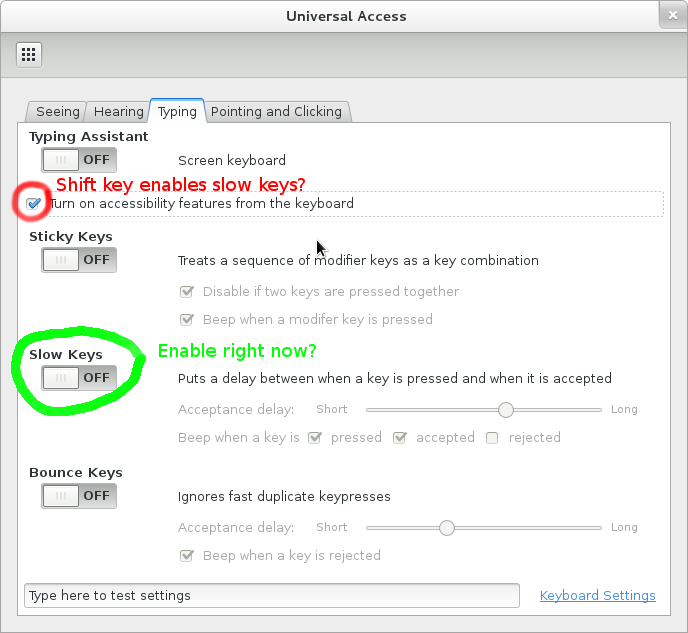
In GNOME3, you can find these options in the Universal Access panel of your System Settings:


If "Turn on accessibility features from the keyboard" is checked, holding shift will enable/disable SlowKeys. If the SlowKeys toggle is on, SlowKeys are always on.

The equivalent gsettings command (to uncheck the checkbox) is:
gsettings set org.gnome.desktop.a11y.keyboard enable false
 I recommend that if you do not need this feature, uncheck the checkbox to avoid nasty surprises. I've also added a patch to the X server to put a warning in the log if SlowKeys is enabled via the shift key. This should make future triaging a bit easier. If you see the message
(II) XKB SlowKeys are now enabled. Hold shift to disable.
in your log, you're likely better off disabling the checkbox. This patch will be in server 1.13 and server 1.12.3.
 
GNOME3 should also warn about SlowKeys being enabled but due to Bug 668213 it stopped doing so in January. Affected is GNOME 3.2+ but we're working on a fix to this.

_XkbErrCode2 macro explanation

While debugging some keyboard layout issues, I got this error:
X Error of failed request:  BadValue (integer parameter out of range for operation)
  Major opcode of failed request:  145 (XKEYBOARD)
  Minor opcode of failed request:  9 (XkbSetMap)
  Value in failed request:  0x163f0005
  Serial number of failed request:  116
  Current serial number in output stream:  122
X Errors are supposed to be useful to the client, usually denoting some error code (e.g. BadValue) and, if possible, the value that triggered it. After reading the code, I found the _XkbErrCode2 family of macros that expand to fill in the error code.
#define _XkbErrCode2(a,b) \
   ((XID)((((unsigned int)(a))<<24)|((b)&0xffffff)))
#define _XkbErrCode3(a,b,c) \
   _XkbErrCode2(a,(((unsigned int)(b))<<16)|(c))
#define _XkbErrCode4(a,b,c,d) \
   _XkbErrCode3(a,b,((((unsigned int)(c))<<8)|(d)))
Easy enough to decompose on the client though there's no indication of which decomposed representation is the correct one.
xkb/xkb.c:1742 _XkbErrCode3(0x16, i + req->firstKeySym, wire->width);
xkb/xkb.c:1749 _XkbErrCode4(0x16, i + req->firstKeySym, wire->nSyms, w);
That's when I started wondering what the 0x16 could mean - could it possibly be _XkbErrBadValue (from xkbfile.h) Bit generic, but possible. But why isn't it using the define? Looking at other _XkbErrCode calls, some were somewhat close but others were miles out. XkbBell returning _XkbErrMissingVMods? That didn't make sense.

And that's when it struck me: they didn't have any meaning. 0x16 is literally 0x16, the 22nd error code statement in this function. And, in this case also the 23rd since it is used twice. Of course, if one ever de-duplicate some of the XKB code the numbering is out. And I couldn't find a place where this is documented, so who knows how much damage we did to that approach without noticing.

Anyway, if you ever have to google for _XkbErrCode2, I'm hoping this post now comes up and explains the despair you're about to encounter.

Friday, January 20, 2012

XKB breaking grabs - CVE-2012-0064

Given that there is a copious amount of misinformation being spread, here is a summary of CVE-2012-0064, straight from a horse's mouth.

Outline of the issue

The bug allows users to work around screen locking (e.g. gnome-screensaver) by hitting Control+Alt+keypad multiply or Control+Alt+keypad divide. This terminates the input grab the screensaver has and thus allows a user to interact with the desktop, skipping the password entry.

Affected versions

Affected is anyone running X server 1.11 or later (or release candidates thereof). So if "Xorg -version" shows something else on your box, stop worrying. I doubt any distribution would have back-ported the patches.

In Fedora/Red Hat land - the only distributions affected are Fedora 16 and current Fedora Rawhide. Both have been fixed, the F16 update is avaialble here. Note that the update is to xkeyboard-config, not to the server itself.

Fedora 15 is not affected. RHEL 4, 5, 6 and thus CentOS 4, 5, 6 and other derivatives are not affected. I believe that most other distributions have now pushed out updates as well, if you want to link to the respective updates, please do so in the comments.

Sergey has also pushed out xkeyboard-config 2.5 today with the fix included.

History of the feature

The X protocol does not allow the server to break grabs. Once a client has a grab, the server must wait for that client to release the grab, terminate, or the grab window to become unviewable. This is an issue when debugging applications - if your client has a keyboard grab, you cannot use the debugger since all key events will go to the client being debugged. To avoid this issue, the X server has had two combinations to break grabs: Control+Alt+Keypad multiply and Control+Alt+Keypad divide. They forced grab termination inside the X server and although against the protocol it made debugging possible. The option required explicit enabling in the xorg.conf.

These options were removed in server 1.4 and disabled since. Which made debugging hard, so last year we merged a patch to bring them back, together with some other features. They are triggered by XKB actions (as they used to be). The plan was to remove the XKB actions from the default keymap so that the action is available on request but not enabled by default. This is where a miscommunication happened, the removal from the default keymap never happened. So server 1.11 and vanilla xkeyboard-config ship with both the actions available and present in the current keymap. As a result, any user can break a grab from any application and thus get around screen locking.

Outline of the fix

To shoot yourself in the foot, you need two items: a gun and a trigger. We have removed the trigger. The fix we've now pushed into xkeyboard-config removes the actions from the default keymap and into an XKB option instead. So the fix does not remove the gun, but it requires the user to screw the trigger in themselves before trying to hurt themselves. In a default configuration, it is thus no longer possible to break the grab of your screensaver.

To re-enable grab debugging, run setxkbmap with "-option grab:break_actions" or enable "Allow breaking grabs with keyboard actions (warning: security risk)" in the "Miscellaneous compatibility options" in your keyboard layout configuration tool of choice.

Tuesday, June 14, 2011

A man page for xkeyboard-config

Command-line configuration of XKB keyboard maps usually involves setxkbmap:

setxkbmap -layout "foo" -variant "bar" -options "gobble:dygook"

The problem is though that you need to know your layout, your variant, and your options. And they're not always straightforward. What command would you use for a US querty and German Dvorak layout where the Meta key is on the left Windows key and Ctrl is mapped to the Caps Lock key? If you knew the answer [1] without looking it up first you're scaring me. Stay away from children please.

A few days ago Carl Worth asked a few XKB-configuration questions on IRC and amongst other things this led to yet another complaint about the lack of a man page. Which I answered with the usual "feel free to write one". Except that a few hours later I suddenly had the epiphany: we already have all this data - GNOME uses it just fine for its own keyboard configuration panel. A little later some XSL had been beaten into submission enough for me to proudly say that we now have a man page that lists every single option that you can pipe into setxkbmap. xkeyboard-config(7) for president!

This will be available in the next version, scheduled for September 27. Until then, see the git commit here. Fedora users: xkeyboard-config-2.3-2.fc16 and xkeyboard-config-2.3-2.fc15.


[1] setxkbmap -layout "us,de" -variant ",dvorak" \
-option "altwin:left_meta_win,ctrl:nocaps"
Obvious now, isn't it?

Monday, November 15, 2010

XKB mouse emulation removed from default keymap

XKB has a feature referred to as "MouseKeys" or in the case of xkeyboard-config "PointerKeys". Once enabled, the keypad controls the pointer movement and can be used to emulate button events. The default keymap hat the PointerKeys toggle on Shift+NumLock.

Like so many other things, it is a low level feature that has virtually zero desktop integration. The only way to find out whether it is on or not is to hit a key and see the mouse cursor move. That of course requires you to already know about the feature.

If you've accidentally enabled it the only thing you may notice is that your keypad stopped working. Worse, with a nasty bug we had in servers 1.7 and later (fixed now), the mouse buttons would get stuck when PointerKeys was used intermixed with physical mouse button presses. I've received a fair number of bug reports and other complaints about this feature that I finally decided to remove it from the default options. Sergey has pushed the patch to the xkeyboard-config repository over the weekend, so expect that in xkeyboard-config 2.1 and later, PointerKeys will need to be explicitly enabled.

You can do so with the XKB option "keypad:pointerkeys", or by ticking the "Toggle PointerKeys with Shift + NumLock" checkbox in your desktop keyboard configuration UI.

Like the changed zapping behaviour and the middle button emulation default (both of which have completely failed to bring the world to an end, despite claims to the contrary), this is only a changed default. The feature is still there and can be re-enabled on-the-fly or permanently if needed.

Tuesday, June 22, 2010

xmodmap keyboard deconfiguration

Reading this post on linux.com last weekend made me cringe. Not because it is factually wrong (it isn't), but because what's described here is the reason for a great many bugreports and some rather uninformed hatemail. One thing that startled me in particular is the hint that "to really take charge, you need to dig into the X keyboard extension" when the rest of the article doesn't deal with XKB at all. This prompted me to write this blurb here.

The abstraction cardhouse


In X, keyboard input is abstracted. The keyboard sends a keycode to the client. The client then translates that keycode into a keysym (a glyph, in most cases, more or less), given a keycode-keysym table. Keycodes should be treated as arbitrary by the client. Keysyms on the other hand are constant, the keysym for "♥" is always the same (0x1002665). In the core protocol, that lookup table was reasonably straightforward (for some value of "straightforward"), with several modifiers providing access to different levels in the table. The table being based on the max number of modifiers. For 105 keys and two modifiers, the table was essentially 210 symbols wide (modifiers can be "shift", "alt", etc.).

That was deemed to be insufficient, causing the development of the X Keyboard Extension, lovingly referred to as "XKB" or "that bloody nail in my coffin". I won't go into details, but the lookup tables are a tad more complicated. XKB is integrated around core so that XKB and core applications can coexist nicely. Up to a point that for a long time we kept XKB state and core state separately inside the server instead of generating it on-the-fly. What's unfortunate though is that the XKB protocol spec describes how to get the core lookup table from the XKB data. It also describes how to extrapolate from core to XKB. It doesn't however cover the full circle. So if you go from XKB to core back to XKB, guesswork happens.

Anyway, what you need to take from this is that the general rule of thumb is - any commandline tool uses core, any tool that allows you to select a layout, variant or model uses XKB.
And core doesn't support device specifiers, so it can only ever work on the default device or core device, more on that below.

Pulling out the cards


All the above was mostly good until 2007. That's when input hotplug happened. And 2009, when MPX happened. Now none of the old tools work properly anymore. Not because we've broken them, they still do what they've always done. But the environment has changed and what they do isn't sufficient anymore. So before you think about writing an angry comment that we've broken your configuration: stop using input and output hotplugging, stop using suspend/resume, stop using a desktop environment that manages your keyboard configuration. Then you'll notice everything still works as before and you can xmodmap away.

So why did everything break since?
Back before input hotplug we had one device that was deemed the "core keyboard". Whenever anything configured the device it set the configuration on this core device. Since xset, xmodmap and friends work on core only, the XKB configuration was then modified from that core table. All that was fine, because the core keyboard was hardly ever changed. Now with input-hotplug and MPX, we have the physical devices, attached to what is now called "master devices" but still serve the same purpose as the old "core keyboard". However, we've greatly increased the flexibility of the devices and physical devices are more often than not configured directly now. What we then end up with is a master device that has multiple keyboards configured, all with possible different keyboard configurations. In fact, non-US layout users in Fedora 12 are practically guaranteed to have multiple keyboard configurations. We only apply the user-selected layout to actual keyboard devices, not to devices with keys (Power Button, Video Bus, etc.). These devices come up with the "US" default.

In the case of a user with two physical keyboards, one qwerty, one azerty, the matching master device needs to adjust the keyboard configuration of the device in use. This means that it will switch between the two configurations as the devices are used. That works fine too. But if you now use xmodmap to change the the keyboard config on the master device, this configuration only stays as long as the same physical keyboard device is being used.
Now, the simple fix for this is to apply the new configuration to all devices instead of just the master device. And that's exactly what we do. However, this doesn't work with hotplugging. Once a new device is plugged in, it comes up with the configuration configured in the xorg.conf again. And that config doesn't include whatever xmodmap settings were applied later. So once that device is used, the settings are lost again or at least lost on this device.
Now sprinkle into this the fact that core doesn't really support multiple groups (layouts) on the same keyboard, that keycodes may be different between devices, that with MPX a device that was a slave to an xmodmap configured master device may end up being attached to a master that has a different XKB configuration and you've got the start of an interesting career.

The fix for all this is simple: make the session handle all keyboards, existing and hotplugged ones, and let it update the config accordingly. Whenever you're using a tool like xmodmap it is your responsibility to reapply the config after changing keyboards. Which brings me back to the article above - it curiously didn't mention that. So I strongly recommend that instead of configuring your keyboard with xmodmap you spend your time helping your favourite desktop environment to provide tools to cover your use-case.


PS: surprisingly "deconfiguration" doesn't exist in the dictionary but it seems the best word to describe what xmodmap does.

Thursday, August 20, 2009

Re-designing input methods with XKB

I've had an interesting meeting with Jens Petersen yesterday about input methods. Jens is one of the i18n guys working for Red Hat.

Input methods are a way of merging several typed symbols into one actual symbols. Western languages rarely use them (the compose key isn't quite the same), but many eastern languages rely on them. To give one (made up) example, an IM setup allows you to type "qqq" and converts it into the chinese symbol for tree.

Unfortunately, IM implementations are somewhat broken and rely on a multitude of hacks. Right now, IM implementations often need to hook onto keycodes instead of keysyms. Keycodes are a numerical value that is usually the same for a key (except when it isn't). So "q" will always be the same keycode (except when it isn't). In X, a keycode has no meaning other than being an index into the keysym table.

Keysyms are the actual symbols that are to be displayed. So while the "q" key may have a keycode of 24, it will have the keysym for "q" in qwerty and the keysym for "a" in azerty.

And here's where everything goes wrong for IM. If you listen for keycodes, and you switch drivers, then keycode 24 isn't the same key anymore. If you listen for keysyms and you switch layout, keysym "q" isn't the same key anymore. Oops.

During a previous meeting and the one yesterday, we came up with a solution to fix them properly.

Let's take a step back and look at keyboard input. The user hits a physical key, usually because of what is printed on that key. That key generates a keycode, which represents a keysym. That keysym is usually the same symbol as what is printed on the keyboard. (Of course, there are exceptions to that with the prime example being dvorak layout on a qwerty physical keyboard)
In the end, IM should aim to provide the same functionality, with the added step of combining multiple symbols into one.

For IM implementations, we can differ between two approaches:
In the first approach, a set of keysyms should combine to a final symbol. For example, typing "tree" should result in a tree symbol. This case can be fixed easily by the IM implementation only ever dealing with keysyms. Where the key is located doesn't matter and it works equally well with us(qwerty) and fr(dvorak). As a mental bridge: if the symbols come in via morse code and you can convert to the correct final symbol, then your IM is in this category. This approach is easy to deal with, so we can close the case on it.

In the second approach, a set of key presses should combine to a final symbol. For example, typing the top left key four times should result in a tree symbol. In this case, we can't hook onto keysyms because they may change with the layout. But we can't hook onto keycodes either because they are essentially random.

Wait. What? Why does the keysym change with the layout?

Because we have the wrong layout selected. If you're trying to type Chinese, you shouldn't have a us layout. If you're trying to type Japanese, you shouldn't have a french layout. Because these keysyms don't represent what the key is supposed to do. The keysyms are supposed to represent what is printed on the keyboard, and those symbols are Chinese, Japanese, Indic, etc. So the solution is to fix up the keysyms. Instead of trying to listen for a "q", the keyboard layout should generate a "tree" keysym. The IM implementation can then listen for this symbol and combine to the final symbol as required.

This essentially means that for each keyboard with intermediate symbols there should be an appropriate keyboard layout - just as there is for western languages. And once these keysyms are available, the second approach becomes identical to the first approach and it doesn't matter anymore where the physical key is located.

The good thing about this approach are that users and developers can leverage existing tools for selecting and changing between different layouts. (bonus points for using the word "leverage") It also means that a more unified configuration between standard DE tools and IM tools is possible.

For the IM implementation, this simplifies things by a bit. First of all, it can listen to the XKB group state to adjust automatically whether IM is needed or not. For example, if us(qwerty) and traditional chinese are configured as layouts, the IM implementation can kick in whenever the group toggles to chinese. As long as it is on us(qwerty), it can slumber in the background.

Second, no layout-specific hacks are required. The physical location of the key, the driver, they all don't matter anymore. Even morse-code is supported now ;)

Talking to Jens, his main concern is that XKB limits to 4 groups at a time. This restriction is built into the protocol and won't disappear completely anytime soon. Though XI2 and XKB2 address this issue, it will take a while to get a meaningful adoption rate. Nonetheless, the approach above should make IM for the large majority of users more robust and predictable, without the issues coming up whenever hacks are involved.

I think this is the right approach, Jens agrees and Sergey Udaltsov, the xkeyboard-config maintainer too. So now we just need to get this implemented, but it will take a while to sort out all the details and move all languages over.

Friday, September 12, 2008

RMLVO keyboard configuration

This article explains how different keyboard layouts are selected these days. RMLVO stands for rules, models, layouts, variants and options.

  • Rules are simply sets of combinations that result in - hopefully - useful keyboards. Rules combine MLVO to a full keyboard description.
  • Models describe the physical keyboard, both in geometry and in keycodes (see below).
  • Layouts describe the language dependent literals.
  • Variants are variations of or additions to layouts to cover larger or different key ranges.
  • Options are extras added, independent of the keyboard layout, such as special key behaviours and control keys.

RMLVO is the preferred way of selecting keyboard layouts, as it simplifies it for the user by combining meaningful defaults that are then converted into XKB's internal form of keycodes, types, compat, symbols and geometry (Ktcsg). In this article, I will ignore Ktcsg as much as possible, which will leave some questions unanswered. A follow-up article on XKB's internal form will come in the hopefully near future.
The commandline interface to RMLVO configuration is setxkbmap. Here's an example of how setxkbmap converts RMVLO into Ktcsg:


whot@possum:~$> setxkbmap -print -rules evdev -model evdev -layout us \
-variant intl -option compose:caps
xkb_keymap {
xkb_keycodes { include "evdev+aliases(qwerty)" };
xkb_types { include "complete" };
xkb_compat { include "complete" };
xkb_symbols { include "pc+us(intl)+inet(evdev)+level3(ralt_switch_for_alts_toggle)+group(alts_toggle)+group(alt_shift_toggle)+compose(caps)" };
xkb_geometry { include "pc(pc104)" };
};

This basic description is then passed to xkbcomp which compiles the full keyboard description and loads it into the server. For this article, I will only explain how setxkbmap achieves the above description from the commandline options. I will also ignore geometry, which describes the keyboard but does not have any effect on its actual working. All you need to know for now is that geometry describes each physical key size and their relationship to each other, so you could paint a funky graphic of your keyboard.

Let's go through the other stuff:

First an important distinction: We have scancodes, Keycodes and Keysyms. Scancodes are what the physical keyboard provides. They don't change.
Keycodes are standardised 3-4 letter descriptions of key meanings (e.g. ESC for Escape, but also AD01 for "first key in second key row", usually the q-key). Keycodes have no language-dependency. Keysym is the symbolic representation of a letter in a particular language (e.g. 'A').

Key to understanding the inner works of keyboard support in X is accepting that those three need to be mapped against each other. For example, if you hit the Q key, the keyboard may generate a scancode of 24, mapped to AD01, mapped to "q". A keyboard event contains the keycode, but a client, you *never never* think in keycodes or scancodes. You always think in keysyms, and use the scan/keycode as a method of getting there. Why? Modifiers. If you press shift, you still get the same scan/keycode when hitting a key (just test this with xev). The keysym however is different - usually the capital form of the respective letter. A keycode/scancode itself has no meaning, it only gets it in combination with the current keyboard symbol table and the modifier state. And both modifier state and keyboard symbol table may change at any time.

Back to our RMLVO configuration: setxkbmap uses libxkbfile to parse /usr/share/X11/xkb/ (package xkeyboard-config) and combine the files there into a meaningful selection.

setxkbmap -print [args]

applies the given args to the rule set and prints the output to the screen. If you leave out -print, you'll load the new configuration in the server too.

The default ruleset used to be xfree86 or xorg (a symlink to base). For evdev, the ruleset is now "evdev".
Let's look at /usr/share/X11/xkb/rules/xorg. In the first part of the file, we see a number of model definitions, these all contribute to the geometry and the symbols generated. Ignoring most of the top of the rules/xorg file which consists of variable declarations, the interesting part starts at the following line:
! model  = keycodes
i.e. which model maps to which keycodes.
The one that is to be used most commonly these days is evdev, i.e. the line

! model = keycodes
evdev = evdev

tells us that for the model evdev, the keycodes "evdev" are to be used. OLPC also uses evdev, and the xfree86 keycode range is the fallback. Note that if you're using the *rules* evdev, you don't need to specify the *model* evdev, it's implied (and you thought XKB was confusing, eh?).

The full tables of scancode - keycode mapping are in /usr/share/X11/xkb/keycodes/, where the file name is the model specified. In the evdev model, scancode 24 maps to AD01, the key next to TAB. Evdev is a bit special here, as the kernel takes care of the physical differences of the keyboards, providing a uniform scancode range for all keyboards. In the xfree86 keycode table, the scancodes are the actual physical codes.

So now we have our device-dependent scancodes mapped to device-independent keycodes. What do we do with keycodes? They are mapped to the language-specific literals that we eventually want to see on the screen when we hit a key.

This is specified further down the rules/xorg file:
!model layout variant = symbols

This table lists which symbol tables are to be loaded if a specific model, layout and variant has been selected. Layout is basically the language, variants can be e.g. intl or nodeadkeys. There's another table like that, but just mapping model and layout to symbols, without variants.
US keyboards are covered by a fallback in the ML->S mapping table.

!model layout = symbols
* * = pc+%l%(v)

Following this fallback line, the commands

setxkbmap -print -layout us
setxkbmap -print -layout us -variant intl

result in pc+us and pc+us(intl), respectively.

The actual symbol mappings are in /usr/share/X11/xkb/symbols/. Let's have a look at the symbol table for AD01 (the key next to TAB) in the US layout (/usr/share/X11/xkb/symbols/us):

key <AD01> { [ q, Q ] }

It says that the literals q or Q are provided by this keycode. Which one, depends on the Shift level. We can have up to 8 levels per key, each level is triggered by one or more modifiers. Most commonly, Level2 is triggered by Shift and/or CapsLock but that's Ktscg territory so run away as fast as you can.
I didn't discuss options here either because they are just more of the same and only become really important when we discuss Ktcsg.


That's basically it. We know how by going through the various files we can assemble a basic description of how the keyboard should map the physical scancode into a literal keysym. If we can accept that xkbcomp parses the files appropriately to get *full* scancode-keycode mapping, and a *full* keycode-keysym mapping, we now know how a little command-line invocation smartly combines to the correct layout.

As said before, setxkbmap -print shows the current settings, alternatively setxkbmap with parameters changes them

whot@possum:~$> setxkbmap -print -layout us -option "" -variant intl -model evdev
xkb_keymap {
xkb_keycodes { include "evdev+aliases(qwerty)" };
xkb_types { include "complete" };
xkb_compat { include "complete" };
xkb_symbols { include "pc+us(intl)+inet(evdev)" };
xkb_geometry { include "pc(pc104)" };
};


You don't have to specify everything all the time, setxkbmap knows your current setting through the _XKB_RULES_NAMES property (xprop -root | grep XKB). So a command of
setxkbmap -layout de
is enough to switch to german layout.

Let's sum up:

XKB keyboard configuration is provided by xkeyboard-config which provides a set of Rules. Rules state that how certain Models, Layouts and Variants are combined into XKB's internal Ktscg format. Once we have this combination of Ktcsg, we can submit it to xkbcomp, which compiles the full keyboard description and loads it into the server. This however, will be another article.


Thanks to Daniel Stone and Timo Aaltonen for their feedback.