Monday, December 12, 2016

libinput touchpad tap analysis

A short while ago, I asked a bunch of people for long-term touchpad usage data (specifically: evemu recordings). I currently have 25 sets of data, the shortest of which has 9422 events, the longest of which has 987746 events. I requested that evemu-record was to be run in the background while people use their touchpad normally. Thus the data is quite messy, it contains taps, two-finger scrolling, edge scrolling, palm touches, etc. It's also raw data from the touchpad, not processed by libinput. Some care has to be taken with analysis, especially since it is weighted towards long recordings. In other words, the user with 987k events has a higher influence than the user with 9k events. So the data is useful for looking for patterns that can be independently verified with other data later. But it's also useful for disproving hypothesis, i.e. "we cannot do $foo because some users' events show $bla".

One of the things I've looked into was tapping. In libinput, a tap has two properties: a time threshold and a movement threshold. If the finger is held down longer than 180ms or it moves more than 3mm it is not a tap. These numbers are either taken from synaptics or just guesswork (both, probably). The need for a time-based threshold is obvious: we don't know whether the user is tapping until we see the finger up event. Only if that doesn't happen within a given time we know the user simply put the finger down. The movement threshold is required because small movements occur while tapping, caused by the finger really moving (e.g. when tapping shortly before/after a pointer motion) or by the finger center moving (as the finger flattens under pressure, the center may move a bit). Either way, these thresholds delay real pointer movement, making the pointer less reactive than it could be. So it's in our interest to have these thresholds low to get reactive pointer movement but as high as necessary to have reliable tap detection.

General data analysis

Let's look at the (messy) data. I wrote a script to calculate the time delta and movement distance for every single-touch sequence, i.e. anything with two or more fingers down was ignored. The script used a range of 250ms and 6mm of movement, discarding any sequences outside those thresholds. I also ignored anything in the left-most or right-most 10% because it's likely that anything that looks like a tap is a palm interaction [1]. I ran the script against those files where the users reported that they use tapping (10 users) which gave me 6800 tap sequences. Note that the ranges are purposely larger than libinput's to detect if there was a significant amount of attempted taps that exceed the current thresholds and would be misdetected as non-taps.

Let's have a look at the results. First, a simple picture that merely prints the start location of each tap, normalised to the width/height of the touchpad. As you can see, taps are primarily clustered around the center but can really occur anywhere on the touchpad. This means any attempt at detecting taps by location would be unreliable.


Normalized distribution of touch sequence start points (relative to touchpad width/height)

You can easily see the empty areas in the left-most and right-most 10%, that is an artefact of the filtering.

The analysis of time is more interesting: There are spikes around the 50ms mark with quite a few outliers going towards 100ms forming what looks like a narrow normal distribution curve. The data points are overlaid with markers for the mean [2], the 50 percentile, the 90 percentile and the 95 percentile [3]. And the data says: 95% of events fall below 116ms. That's something to go on.


Times between touch down and touch up for a possible tap event.
Note that we're using a 250ms timeout here and thus even look at touches that would not have been detected as tap by libinput. If we reduce to the 180ms libinput uses, we get a 95% percentile of 98ms, i.e. "of all taps currently detected as taps, 95% are 98ms or shorter".

The analysis of distance is similar: Most of the tap sequences have little to no movement, with 50% falling below 0.2mm of movement. Again the data points are overlaid with markers for the mean, the 50 percentile, the 90 percentile and the 95 percentile. And the data says: 95% of events fall below 1.8mm. Again, something to go on.


Movement between the touch down and the touch up event for a possible tap (10 == 1mm)
Note that we're using a 6mm threshold here and thus even look at touches that would not have been detected as tap by libinput. If we reduce to the 3mm libinput uses, we get a 95% percentile of 1.2mm, i.e. "of all taps currently detected as taps, 95% move 1.2mm or less".

Now let's combine the two. Below is a graph mapping times and distances from touch sequences. In general, the longer the time, the longer the more movement we get but most of the data is in the bottom left. Since doing percentiles is tricky on 2 axes, I mapped the respective axes individually. The biggest rectangle is the 95th percentile for time and distance, the number below shows how many data points actually fall into this rectangle. Looks promising, we still have a vast majority of touchpoints fall into the respective 95 percentiles though the numbers are slightly lower than the individual axes suggest.
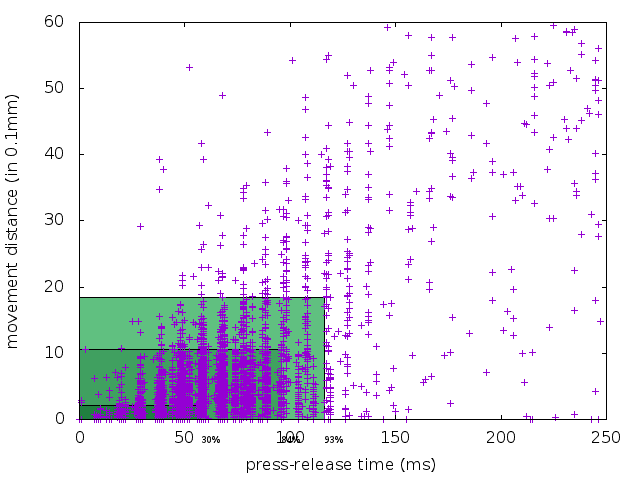

Time to distance map for all possible taps
Again, this is for the 250ms by 6mm movement. About 3.3% of the events fall into the area between 180ms/3mm and 250ms/6mm. There is a chance that some of the touches have have been short, small movements, we just can't know by from data.

So based on the above, we learned one thing: it would not be reliable to detect taps based on their location. But we also suspect two things now: we can reduce the timeout and movement threshold without sacrificing a lot of reliability.

Verification of findings

Based on the above, our hypothesis is: we can reduce the timeout to 116ms and the threshold to 1.8mm while still having a 93% detection reliability. This is the most conservative reading, based on the extended thresholds.

To verify this, we needed to collect tap data from multiple users in a standardised and reproducible way. We wrote a basic website that displays 5 circles (see the screenshot below) on a canvas and asked a bunch of co-workers in two different offices [4] to tap them. While doing so, evemu-record was running in the background to capture the touchpad interactions. The touchpad was the one from a Lenovo T450 in both cases.


Screenshot of the <canvas> that users were asked to perform the taps on.
Some users ended up clicking instead of tapping and we had to discard those recordings. The total number of useful recordings was 15 from the Paris office and 27 from the Brisbane office. In total we had 245 taps (some users missed the circle on the first go, others double-tapped).

We asked each user three questions: "do you know what tapping/tap-to-click is?", "do you have tapping enabled" and "do you use it?". The answers are listed below:

  • Do you know what tapping is? 33 yes, 12 no
  • Do you have tapping enabled? 19 yes, 26 no
  • Do you use tapping? 10 yes, 35 no

I admit I kinda screwed up the data collection here because it includes those users whose recordings we had to discard. And the questions could've been better. So I'm not going to go into too much detail. The only useful thing here though is: the majority of users had tapping disabled and/or don't use it which should make any potential learning effect disappear[5]

Ok, let's look at the data sets, same scripts as above:


Times between touch down and touch up for tap events

Movement between the touch down and the touch up events of a tap (10 == 1mm)
95th percentile for time is 87ms. 95th percentile for distance is 1.09mm. Both are well within the numbers we expected we saw above. The combined diagram shows that 87% of events fall within the 87ms/10.9mm box.

Time to distance map for all taps
The few outliers here are close enough to the edge that expanding the box to to 100ms/1.3mm we get more than 95%. So it appears that our hypothesis is correct, reducing the timeout to 116ms and 1.8mm will have a 95% detection reliability. Furthermore, using the clean data it looks like we can use a lower threshold than previously assumed and still get a good detection ratio. Specifically, data collected in a controlled environment across 42 different users of varying familiarity with touchpad tapping shows that 100ms and 1.3mm gets us a 95% detection rate of taps.

What does this mean for users?

Based on the above, the libinput thresholds will be reduced to 100ms and 1.3mm. Let's see how we go with this and then we can increase it in the future if misdetection is higher than expected. Patches will on the wayland-devel list shortly.

For users that don't have tapping enabled, this will not change anything. All users who have tapping enabled will see a more responsive cursor on small movements as the time and distance thresholds have been significantly reduced. Some users may see a drop in tap detection rate. This is hopefully a subconscious enough effect that those users learn to tap faster or with less movement. If not, we have to look at it separately and see how we can deal with that.

If you find any issues with the analysis above, please let me know.

[1] These scripts analyse raw touchpad data, they don't benefit from libinput's palm detection
[2] Note: mean != average, the mean is less affected by strong outliers. look it up, it's worth knowing
[3] X percentile means X% of events fall below this value
[4] The Brisbane and Paris offices. No separate analysis was done, so it is unknown whether close proximity to baguettes has an effect to tap behaviour
[5] i.e. the effect of users learning how to use a system that doesn't work well out-of-the-box. This may result in e.g. quicker taps from those that are familiar with the system vs those that don't.

Wednesday, December 7, 2016

xinput is not a configuration UI

xinput is a tool to query and modify X input device properties (amongst other things). Every so-often someone-complains about it's non-intuitive interface, but this is where users are mistaken: xinput is a not a configuration UI. It is a DUI - a developer user interface [1] - intended to test things without having to write custom (more user-friendly) for each new property. It is nothing but a tool to access what is effectively a key-value store. To use it you need to know not only the key name(s) but also the allowed formats, some of which are only documented in header files. It is intended to be run under user supervision, anything it does won't survive device hotplugging. Relying on xinput for configuration is the same as relying on 'echo' to toggle parameters in /sys for kernel configuration. It kinda possibly maybe works most of the time but it's not pretty. And it's not intended to be, so please don't complain to me about the arcane user interface.

[1] don't do it, things will be a bit confusing, you may not do the right thing, you can easily do damage, etc. A lot of similarities... ;)

Tuesday, December 6, 2016

New udev property: XKB_FIXED_LAYOUT for keyboards that must not change layouts

This post mostly affects developers of desktop environments/Wayland compositors. A systemd pull request was merged to add two new properties to some keyboards: XKB_FIXED_LAYOUT and XKB_FIXED_VARIANT. If set, the device must not be switched to a user-configured layout but rather the one set in the properties. This is required to make fake keyboard devices work correctly out-of-the-box. For example, Yubikeys emulate a keyboard and send the configured passwords as key codes matching a US keyboard layout. If a different layout is applied, then the password may get mangled by the client.

Since udev and libinput are sitting below the keyboard layout there isn't much we can do in this layer. This is a job for those parts that handle keyboard layouts and layout configurations, i.e. GNOME, KDE, etc. I've filed a bug for gnome here, please do so for your desktop environment.

If you have a device that falls into this category, please submit a systemd patch/file a bug and cc me on it (@whot).

Monday, December 5, 2016

The future of xinput, xmodmap, setxkbmap, xsetwacom and other tools under Wayland

This post applies to most tools that interface with the X server and change settings in the server, including xinput, xmodmap, setxkbmap, xkbcomp, xrandr, xsetwacom and other tools that start with x. The one word to sum up the future for these tools under Wayland is: "non-functional".

An X window manager is little more than an innocent bystander when it comes to anything input-related. Short of handling global shortcuts and intercepting some mouse button presses (to bring the clicked window to the front) there is very little a window manager can do. It's a separate process to the X server and does not receive most input events and it cannot affect what events are being generated. When it comes to input device configuration, any X client can tell the server to change it - that's why general debugging tools like xinput work.

A Wayland compositor is much more, it is a window manager and the display server merged into one process. This gives the compositor a lot more power and responsibility. It handles all input events as they come out of libinput and also manages device's configuration. Oh, and instead of the X protocol it speaks Wayland protocol.

The difference becomes more obvious when you consider what happens when you toggle a setting in the GNOME control center. In both Wayland and X, the control center toggles a gsettings key and waits for some other process to pick it up. In both cases, mutter gets notified about the change but what happens then is quite different. In GNOME(X), mutter tells the X server to change a device property, the server passes that on to the xf86-input-libinput driver and from there the setting is toggled in libinput. In GNOME(Wayland), mutter toggles the setting directly in libinput.

Since there is no X server in the stack, the various tools can't talk to it. So to get the tools to work they would have to talk to the compositor instead. But they only know how to speak X protocol, and no Wayland protocol extension exists for input device configuration. Such a Wayland protocol extension would most likely have to be a private one since the various compositors expose device configuration in different ways. Whether this extension will be written and added to compositors is uncertain, I'm not aware of any plans or even intentions to do so (it's a very messy problem). But either way, until it exists, the tools will merely shout into the void, without even an echo to keep them entertained. Non-functional is thus a good summary.

Please don't use pastebins in bugs

pastebins are useful for dumping large data sets whenever the medium of conversation doesn't make this easy or useful. IRC is one example, or audio/video conferencing. But pastebins only work when the other side looks at the pastebin before it expires, and the default expiry date for a pastebin may only be a few days.

This makes them effectively useless for bugs where it may take a while for the bug to be triaged and the assignee to respond. It may take even longer to figure out the source of the bug, and if there's a regression it can take months to figure it out. Once the content disappears we have to re-request the data from the reporter. And there is a vicious dependency too: usually, logs are more important for difficult bugs. Difficult bugs take longer to fix. Thus, with pastebins, the more difficult the bug, the more likely the logs become unavailable.

All useful bug tracking systems have an attachment facility. Use that instead, it's archived with the bug and if a year later we notice a regression, we still have access to the data.

If you got here because I pasted the link to this blog post, please do the following: download the pastebin content as raw text, then add it as attachment to the bug (don't paste it as comment). Once that's done, we can have a look at your bug again.

Tuesday, November 29, 2016

libinput now requires axis resolutions for graphics tablets

I pushed the patch to require resolution today, expect this to hit the general public with libinput 1.6. If your graphics tablet does not provide axis resolution we will need to add a hwdb entry. Please file a bug in systemd and CC me on it (@whot).

How do you know if your device has resolution? Run sudo evemu-describe against the device node and look for the ABS_X/ABS_Y entries:

#     Event code 0 (ABS_X)
#       Value   2550
#       Min        0
#       Max     3968
#       Fuzz       0
#       Flat       0
#       Resolution 13
#     Event code 1 (ABS_Y)
#       Value   1323
#       Min        0
#       Max     2240
#       Fuzz       0
#       Flat       0
#       Resolution 13
if the Resolution value is 0 you'll need a hwdb entry or your tablet will stop working in libinput 1.6. You can file the bug now and we can get it fixed, that way it'll be in place once 1.6 comes out.

Sunday, November 20, 2016

Fedora - retiring xorg-x11-drv-synaptics

The Fedora Change to retire the synaptics driver was approved by FESCO. This will apply to Fedora 26 and is part of a cleanup to, ironically, make the synaptics driver easier to install.

Since Fedora 22, xorg-x11-drv-libinput is the preferred input driver. For historical reasons, almost all users have the xorg-x11-drv-synaptics package installed. But to actually use the synaptics driver over xorg-x11-drv-libinput requires a manually dropped xorg.conf.d snippet. And that's just not ideal. Unfortunately, in DNF/RPM we cannot just say "replace the xorg-x11-drv-synaptics package with xorg-x11-drv-libinput on update but still allow users to install xorg-x11-drv-synaptics after that".

So the path taken is a package rename. Starting with Fedora 26, xorg-x11-drv-libinput's RPM will Provide/Obsolete [1] xorg-x11-drv-synaptics and thus remove the old package on update. Users that need the synaptics driver then need to install xorg-x11-drv-synaptics-legacy. This driver will then install itself correctly without extra user intervention and will take precedence over the libinput driver. Removing xorg-x11-drv-synaptics-legacy will remove the driver assignment and thus fall back to libinput for touchpads. So aside from the name change, everything else works smoother now. Both packages are now updated in Rawhide and should be available from your local mirror soon.

What does this mean for you as a user? If you are a synaptics user, after an update/install, you need to now manually install xorg-x11-drv-synaptics-legacy. You can remove any xorg.conf.d snippets assigning the synaptics driver unless they also include other custom configuration.

See the Fedora Change page for details. Note that this is a Fedora-specific change only, the upstream change for this is already in place.

[1] "Provide" in RPM-speak means the package provides functionality otherwise provided by some other package even though it may not necessarily provide the code from that package. "Obsolete" means that installing this package replaces the obsoleted package.