Showing posts with label wayland. Show all posts

Thursday, August 11, 2022

The new XWAYLAND extension is available

As of xorgproto 2022.2, we have a new X11 protocol extension. First, you may rightly say "whaaaat? why add new extensions to the X protocol?" in a rather unnecessarily accusing way, followed up by "that's like adding lipstick to a dodo!". And that's not completely wrong, but nevertheless, we have a new protocol extension to the ... [checks calendar] almost 40 year old X protocol. And that extension is, ever creatively, named "XWAYLAND".

If you recall, Xwayland is a different X server than Xorg. It doesn't try to render directly to the hardware, instead it's a translation layer between the X protocol and the Wayland protocol so that X clients can continue to function on a Wayland compositor. The X application is generally unaware that it isn't running on Xorg and Xwayland (and the compositor) will do their best to accommodate for all the quirks that the application expects because it only speaks X. In a way, it's like calling a restaurant and ordering a burger because the person answering speaks American English. Without realising that you just called the local fancy French joint and now the chefs will have to make a burger for you, totally without avec.

Anyway, sometimes it is necessary for a client (or a user) to know whether the X server is indeed Xwayland. Previously, this was done through heuristics: the xisxwayland tool checks for XRandR properties, the xinput tool checks for input device names, and so on. These heuristics are just that, though, so they can become unreliable as Xwayland gets closer to emulating Xorg or things just change. And properties in general are problematic since they could be set by other clients. To solve this, we now have a new extension.

The XWAYLAND extension doesn't actually do anything, it's the bare minimum required for an extension. It just needs to exist and clients only need to XQueryExtension or check for it in XListExtensions (the equivalent to xdpyinfo | grep XWAYLAND). Hence, no support for Xlib or libxcb is planned. So of all the nightmares you've had in the last 2 years, the one of misidentifying Xwayland will soon be in the past.

Tuesday, May 19, 2020

xisxwayland checks for Xwayland ... or not

One of the more common issues we encounter debugging things is that users don't always know whether they're running on a Wayland or X11 session. Which I guess is a good advertisement for how far some of the compositors have come. The question "are you running on Xorg or Wayland" thus comes up a lot and suggestions previously included things like "run xeyes", "grep xinput list", "check xrandr" and so on and so forth. None of those are particularly scriptable, so there's a new tool around now: xisxwayland.

Run without arguments it simply exits with exit code 0 if the X server is Xwayland, or 1 otherwise. Which means use can use it like this:

$ cat my-xorg-only-script.sh
#!/bin/bash

if xisxwayland; then
   echo "This is an Xwayland server!";
   exit 1
fi

...
Or, in the case where you have a human user (gasp!), you can ask them to run:
$ xisxwayland --verbose
Xwayland: YES
And even non-technical users should be able to interpret that.

Note that the script checks for Xwayland (hence the name) via the $DISPLAY environment variable, just like any X application. It does not check whether there's a Wayland compositor running but for most use-cases this doesn't matter anyway. For those where it matters you get to write your own script. Congratulations, I guess.

Friday, May 8, 2020

Wayland doesn't support $BLAH

Gather round children, it's analogy time! First, some definitions:

  • Wayland is a protocol to define the communication between a display server (the "compositor") and a client, i.e. an application though the actual communication is usually done by a toolkit like GTK or Qt.
  • A Wayland Compositor is an implementation of a display server that (usually but not necessary) handles things like displaying stuff on screen and handling your input devices, among many other things. Common examples for Wayland Compositors are GNOME's mutter, KDE's KWin, weston, sway, etc.[1]

And now for the definitions we need for our analogy:

  • HTTP is a protocol to define the communication between a web server and a client (usually called the "browser")
  • A Web Browser is an implementation that (sometimes but not usually) handles things like displaying web sites correctly, among many other things. Common examples for Web Browsers are Firefox, Chrome, Edge, Safari, etc. [2]

And now for the analogy:

The following complaints are technically correct but otherwise rather pointless to make:

  • HTTP doesn't support CSS
  • HTTP doesn't support adblocking
  • HTTP doesn't render this or that website correctly
And much in the same style, the following complaints are technically correct but otherwise rather pointless to make:
  • Wayland doesn't support keyboard shortcuts
  • Wayland doesn't support screen sharing
  • Wayland doesn't render this or that application correctly
In most cases you may encounter (online or on your setup), saying "Wayland doesn't support $BLAH" is like saying "HTTP doesn't support $BLAH". The problem isn't in with Wayland itself, it's a missing piece or bug in the compositor you're using.

Likewise, saying "I don't like Wayland" is like saying "I don't like HTTP".The vast majority of users will have negative feelings towards the browser, not the transport protocol.

[1] Because they're implementations of a display server they can speak multiple protocols and some compositors can also be X11 window managers, much in the same way as you can switch between English and your native language(s).
[2] Because they're implementations of a web browser they can speak multiple protocols and some browsers can also be FTP file managers, much in the same way as... you get the point

Tuesday, May 23, 2017

xinput list shows a "xwayland-pointer" device but not my real devices and what to do about it

TLDR: If you see devices like "xwayland-pointer" show up in your xinput list output, then you are running under a Wayland compositor and debugging/configuration with xinput will not work.

For many years, the xinput tool has been a useful tool to debug configuration issues (it's not a configuration UI btw). It works by listing the various devices detected by the X server. So a typical output from xinput list under X could look like this:

:: whot@jelly:~> xinput list
⎡ Virtual core pointer                          id=2    [master pointer  (3)]
⎜   ↳ Virtual core XTEST pointer                id=4    [slave  pointer  (2)]
⎜   ↳ SynPS/2 Synaptics TouchPad                id=22   [slave  pointer  (2)]
⎜   ↳ TPPS/2 IBM TrackPoint                     id=23   [slave  pointer  (2)]
⎜   ↳ ELAN Touchscreen                          id=20   [slave  pointer  (2)]
⎣ Virtual core keyboard                         id=3    [master keyboard (2)]
    ↳ Virtual core XTEST keyboard               id=5    [slave  keyboard (3)]
    ↳ Power Button                              id=6    [slave  keyboard (3)]
    ↳ Video Bus                                 id=7    [slave  keyboard (3)]
    ↳ Lid Switch                                id=8    [slave  keyboard (3)]
    ↳ Sleep Button                              id=9    [slave  keyboard (3)]
    ↳ ThinkPad Extra Buttons                    id=24   [slave  keyboard (3)]
Alas, xinput is scheduled to go the way of the dodo. More and more systems are running a Wayland session instead of an X session, and xinput just doesn't work there. Here's an example output from xinput list under a Wayland session:
$ xinput list
⎡ Virtual core pointer                     id=2 [master pointer  (3)]
⎜   ↳ Virtual core XTEST pointer               id=4 [slave  pointer  (2)]
⎜   ↳ xwayland-pointer:13                      id=6 [slave  pointer  (2)]
⎜   ↳ xwayland-relative-pointer:13             id=7 [slave  pointer  (2)]
⎣ Virtual core keyboard                    id=3 [master keyboard (2)]
    ↳ Virtual core XTEST keyboard              id=5 [slave  keyboard (3)]
    ↳ xwayland-keyboard:13                     id=8 [slave  keyboard (3)]
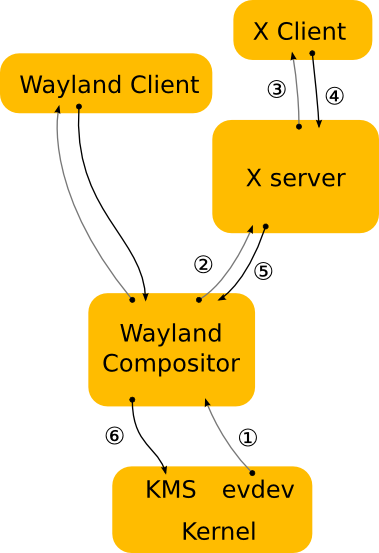
As you can see, none of the physical devices are available, the only ones visible are the virtual devices created by XWayland. On a Wayland session, the X server doesn't have access to the physical devices. Instead, it talks via the Wayland protocol to the compositor. This image from the Wayland documentation shows the architecture:
In the above graphic, devices are known to the Wayland compositor (1), but not to the X server. The Wayland protocol doesn't expose physical devices, it merely provides a 'pointer' device, a 'keyboard' device and, where available, a touch and tablet tool/pad devices (2). XWayland wraps these into virtual devices and provides them via the X protocol (3), but they don't represent the physical devices.

This usually doesn't matter, but when it comes to debugging or configuring devices with xinput we run into a few issues. First, configuration via xinput usually means changing driver-specific properties but in the XWayland case there is no driver involved - it's all handled by libinput inside the compositor. Second, debugging via xinput only shows what the wayland protocol sends to XWayland and what XWayland then passes on to the client. For low-level issues with devices, this is all but useless.

The takeaway here is that if you see devices like "xwayland-pointer" show up in your xinput list output, then you are running under a Wayland compositor and debugging with xinput will not work. If you're trying to configure a device, use the compositor's configuration system (e.g. gsettings). If you are debugging a device, use libinput-debug-events. Or compare the behaviour between the Wayland session and the X session to narrow down where the failure point is.

Saturday, April 1, 2017

inputfd - a protocol for direct access to input devices in wayland

This is a higher-level explanation of the inputfd protocol RFC I sent to the list on March 31. Note that this is a first draft, this protocol may never see the light of the day or may be significantly altered before it lands.

First, what is it? inputfd is a protocol for a Wayland compositor to pass a file descriptor (fd) for an input device directly to the client. The client can then read events off this fd and process them, without any additional buffering in between. In the ideal case, the compositor doesn't care (or even notice) that events are flowing between the kernel and the client. Because the compositor sets up the fd, the client does not need any special privileges.

Why is this needed? There are a few input devices that will not be handled by libinput. libinput is the stack for those devices that have a direct interaction with the desktop - mice, keyboards, touchpads, ... But plenty of devices do not want or require desktop interactions. Joysticks/gamepads are the prime example here, but 3D mice or VR input devices also come to mind. These devices don't control the cursor on the desktop, so the compositor doesn't care about the device's events. Note that the current draft only caters for joysticks, 3D mice etc. are TBD.

Why not handle these devices in libinput? Joysticks in particular are so varied that a library like libinput would have to increase the API surface area massively to cater for every possibility. And in the end it is likely that libinput would merely buffer events and pass them on almost as-is anyway. From a maintenance POV - I don't want to deal with that. And from a technical POV - there's little point to have libinput in between anyway. Furthermore, it's already the case that gaming devices are opened directly by the application rather than going through X. So just connecting the clients with the device directly has a advantages.

What does the compositor do? The compositor has two jobs: device filtering and focus management. In the current draft, a client can say "give me all gaming devices" but it's the compositor that decides which device is classified as such (see below for details). Depending on seat assignment or other policies, a client may only see a fraction of the devices currently connected.

Focus management is relatively trivial: the compositor decides that a client has focus now (e.g. by clicking into the window) and hands that client an fd. On focus out (e.g. alt-tab) the fd is revoked and the client cannot read any more events. Rinse, wash, repeat as the focus changes. Note that the protocol does not define how the focus is decided, that task is up to the compositor. Having focus management in the compositor gives us a simple benefit: the client can't hog the device or read events when it's out of focus. This makes it easy to have multiple clients running that need access to the same device without messing up state in a backgrounded client. The security benefit is minimal, few people enter their password with a joystick. But it's still a warm fuzzy feeling to know that a client cannot read events when it's not supposed to.

What devices are applicable devices? This is one of the TBD of the protocol. The compositor needs to know whether a device is a gaming device or not, but the default udev tag ID_INPUT_JOYSTICK is too crude and provides false positives (e.g. some Wacom tablets have that tag set). The conversion currently goes towards having a database that can define this better, but this point is far from decided on.

There are a couple of other points that are still being discussed. If you have knowledge in game (framework) development, do join the discussion, we need input. Personally I am far from a game developer, so I cannot fathom all the weird corner cases we may have to deal with here. Flying blind while designing a protocol is fun, but not so much when you then have to maintain it for the next 10 years. So some navigational input would be helpful.

And just to make sure you join the right discussion, I've disabled comments here :)

Tuesday, December 6, 2016

New udev property: XKB_FIXED_LAYOUT for keyboards that must not change layouts

This post mostly affects developers of desktop environments/Wayland compositors. A systemd pull request was merged to add two new properties to some keyboards: XKB_FIXED_LAYOUT and XKB_FIXED_VARIANT. If set, the device must not be switched to a user-configured layout but rather the one set in the properties. This is required to make fake keyboard devices work correctly out-of-the-box. For example, Yubikeys emulate a keyboard and send the configured passwords as key codes matching a US keyboard layout. If a different layout is applied, then the password may get mangled by the client.

Since udev and libinput are sitting below the keyboard layout there isn't much we can do in this layer. This is a job for those parts that handle keyboard layouts and layout configurations, i.e. GNOME, KDE, etc. I've filed a bug for gnome here, please do so for your desktop environment.

If you have a device that falls into this category, please submit a systemd patch/file a bug and cc me on it (@whot).

Monday, December 5, 2016

The future of xinput, xmodmap, setxkbmap, xsetwacom and other tools under Wayland

This post applies to most tools that interface with the X server and change settings in the server, including xinput, xmodmap, setxkbmap, xkbcomp, xrandr, xsetwacom and other tools that start with x. The one word to sum up the future for these tools under Wayland is: "non-functional".

An X window manager is little more than an innocent bystander when it comes to anything input-related. Short of handling global shortcuts and intercepting some mouse button presses (to bring the clicked window to the front) there is very little a window manager can do. It's a separate process to the X server and does not receive most input events and it cannot affect what events are being generated. When it comes to input device configuration, any X client can tell the server to change it - that's why general debugging tools like xinput work.

A Wayland compositor is much more, it is a window manager and the display server merged into one process. This gives the compositor a lot more power and responsibility. It handles all input events as they come out of libinput and also manages device's configuration. Oh, and instead of the X protocol it speaks Wayland protocol.

The difference becomes more obvious when you consider what happens when you toggle a setting in the GNOME control center. In both Wayland and X, the control center toggles a gsettings key and waits for some other process to pick it up. In both cases, mutter gets notified about the change but what happens then is quite different. In GNOME(X), mutter tells the X server to change a device property, the server passes that on to the xf86-input-libinput driver and from there the setting is toggled in libinput. In GNOME(Wayland), mutter toggles the setting directly in libinput.

Since there is no X server in the stack, the various tools can't talk to it. So to get the tools to work they would have to talk to the compositor instead. But they only know how to speak X protocol, and no Wayland protocol extension exists for input device configuration. Such a Wayland protocol extension would most likely have to be a private one since the various compositors expose device configuration in different ways. Whether this extension will be written and added to compositors is uncertain, I'm not aware of any plans or even intentions to do so (it's a very messy problem). But either way, until it exists, the tools will merely shout into the void, without even an echo to keep them entertained. Non-functional is thus a good summary.

Monday, November 14, 2016

Does $FEATURE work under Wayland?

I've written more extensively about this here but here's an analogy that should get the point across a bit better: Wayland is just a protocol, just like HTTP. In both cases, you have two sides with very different roles and functionality. In the HTTP case, you have the server (e.g. Apache) and the client (a browser, e.g. Firefox). The communication protocol is HTTP but both sides make a lot of decisions unrelated to the protocol. The server decides what data is sent, the client decides how the data is presented to the user. Wayland is very similar. The server, called the "compositor", decides what data is sent (also: which of the clients even gets the data). The client renders the data [1] and decides what to do with input like key strokes, etc.

Asking Does $FEATURE work under Wayland? is akin to asking Does $FEATURE work under HTTP?. The only answer is: it depends on the compositor and on the client. It's the wrong question. You should ask questions related to the compositor and the client instead, e.g. "does $FEATURE work in GNOME?" or "does $FEATURE work in GTK applications?". That's a question that can be answered.

Of course, there are some cases where the fault is really the protocol itself. But often enough, it's not.

[1] albeit it does so by telling the compositor to display it. The analogy with HTTP only works to some extent... :)

Friday, January 22, 2016

Is Wayland ready yet?

This question turns up a lot, on the irc channel, mailing lists, forums, your local Stammtisch and at weddings. The correct answer is: this is the wrong question. And I'll explain why in this post. Note that I'll be skipping over a couple of technical bits, if you notice those then you're probably not the person that needs to ask the question in the first place.

On your current Linux desktop, right now, you have at least three processes running: the X server, a window manager/compositor and your web browser. The X server is responsible for rendering things to the screen and handling your input. The window manager is responsible for telling the X server where to render the web browser window. Your web browser is responsible for displaying this post. The X server and the window manager communicate over the X protocol, the X server and the web browser do so too. The browser and the window manager communicate through X properties using the X server as a middle man. That too is done via the X protocol. Note: This is of course a very simplified view.

Wayland is a protocol and it replaces the X protocol. Under Wayland, you only need two processes: a compositor and your web browser. The compositor is effectively equivalent to the X server and window manager merged into one thing, and it communicates with the web browser over the Wayland protocol. For this to work you need the compositor and the web browser to be able to understand the Wayland protocol.

This is why the question "is wayland ready yet" does not make a lot of sense. Wayland is the communication protocol and says very little about the implementation of the two sides that you want to communicate.

Let's assume a scenario where we all decide to switch from English to French because it sounds nicer and English was designed in the 80s when ASCII was king so it doesn't support those funky squiggles that the French like to put on every second character. In this scenario, you wouldn't ask "Is French ready yet?" If no-one around you speaks French yet, then that's not the language not being ready, the implementation (i.e. the humans) aren't ready. Maybe you can use French in a restaurant, but not yet in the supermarket. Maybe one waiter speaks both English and French, but the other one French only. So whether you can use French depends very much on the situation. But everyone agrees that eventually we'll all speak French, even though English will hang around for ages until it finally falls out of use. And those squiggles are so cute!

Wayland is the same. The protocol is stable and has been for a while. But not every compositor and/or toolkit/application speak Wayland yet, so it may not be sufficient for your use-case. So rather than asking "Is Wayland ready yet", you should be asking: "Can I run GNOME/KDE/Enlightenment/etc. under Wayland?" That is the right question to ask, and the answer is generally "It depends what you expect to work flawlessly." This also means "people working on Wayland" is often better stated as "people working on Wayland support in ....".

An exception to the above: Wayland as a protocol defines what you can talk about. As a young protocol (compared to X with 30 years worth of extensions) there are things that should be defined in the protocol but aren't yet. For example, Wacom tablet support is currently missing. Those are the legitimate cases where you can say Wayland isn't ready yet and where people are "working on Wayland". Of course, once the protocol is agreed on, you fall back to the above case: both sides of the equation need to implement the new protocol before you can make use of it.

Update 25/01/15: Matthias' answer to Is GNOME on Wayland ready yet?