Tuesday, January 28, 2020

libinput's timer offset errors

Let's say you have a friend (this wouldn't happen to you, of course, just that friend) who is staring at their system logs and wonder why it is full of messages similar to this:

 libinput error: client bug: timer event5 debounce short: offset negative (-7ms)
And the question is of course - what is going on here and why hasn't this been fixed yet. Now, the libinput documentation explains this already but it's always worthwhile to fire out a blog post into the void in the hope someone reads it.

libinput uses a specific model to communicate with the Wayland compositor (or the X server). There is a single epoll file descriptor and that fd will trigger whenever something happens that's of interest to libinput. When that fd triggers, the compositor is expected to call libinput_dispatch() which is the main "do stuff" function of libinput.

The actual trigger doesn't matter, it could be an event from a device but it could be something else. The caller doesn't have to care. All that matters is that there is code like this:

if (libinput_fd_triggered_in_select)
   libinput_dispatch();
And then libinput will do the right thing. Whether you also want events from libinput is almost orthogonal to this.

libinput uses timerfd internally so any timeouts also trigger the epoll fd. Timeouts are scheduled based on the event's time stamp, so if you get an event with timestamp T, a timeout of 180ms will be scheduled for time T + 180ms. So the process looks something like this:

T(0): kernel button event
T(0): libinput_dispatch(): schedule timeout for T(0+180)
...
T(180): epoll fd triggers
T(180): libinput_dispatch(): process timeout
...
This works generally fine. Even with some delays we don't generally need to worry about the timeouts and they still trigger as expected. But some of the timeouts are "short", as in 8ms short. And this is where these warnings may trigger.

Let's say your compositor is busy doing some rendering. The epoll fd triggers with a button event but the compositor is too busy to handle it immediately. Instead, it finishes whatever it's doing and only then calls libinput_dispatch():

T(0): kernel button event
...
T(12): libinput_dispatch(): schedule timeout for T(0+8)

libinput error: client bug: timer event5 debounce short: offset negative (-4ms)
libinput will still use the event's timestamp instead of the wall clock time so the scheduled timeout is no longer in the future. And that is when the error message will be printed. This isn't a libinput bug, it's always a bug in the compositor. Especially gnome-shell is still struggling with these instances and while great strives have been made to make it more responsive, it can still happen.

The error message may seem cryptic, but it provides a bunch of useful information: event5 is your event node, "debounce short" is the timer name so we know where we got stuck. And 4ms gives us an indication how much we got delayed.

And for the record: the other end of this issue - delayed libinput_dispatch() after a timeout should have triggered is handled quietly by libinput. For example, if you have a physical event queued and a timeout expiry, we will process the earlier one first to make sure the sequences are handled correctly.

Friday, October 18, 2019

libinput and tablet pad keys

Upcoming in libinput 1.15 is a small feature to support Wacom tablets a tiny bit better. If you look at the higher-end devices in Wacom's range, e.g. the Cintiq 27QHD you'll notice that at the top right of the device are three hardware-buttons with icons. Those buttons are intended to open the config panel, the on-screen display or the virtual keyboard. They've been around for a few years and supported in the kernel for a few releases. But in userspace, they events from those keys were ignored, casted out in the wild before eventually running out of electrons and succumbing to misery. Well, that's all changing now with a new interface being added to libinput to forward those events.

Step back a second and let's look at the tablet interfaces. We have one for tablet tools (styli) and one for tablet pads. In the latter, we have events for rings, strips and buttons. The latter are simply numerically ordered, so button 1 is simply button 1 with no special meaning. Anything more specific needs to be handled by the compositor/client side which is responsible for assigning e.g. keyboard shortcuts to those buttons.

The special keys however are different, they have a specific function indicated by the icon on the key itself. So libinput 1.15 adds a new event type for tablet pad keys. The events look quite similar to the button events but they have a linux/input-event-codes.h specific button code that indicates what they are. So the compositor can start the OSD, or control panel, or whatever directly without any further configuration required.

This interface hasn't been merged yet, it's waiting for the linux kernel 5.4 release which has a few kernel-level fixes for those keys.

libinput and button scrolling locks

For a few years now, libinput has provided button scrolling. Holding a designated button down and moving the device up/down or left/right creates the matching scroll events. We enable this behaviour by default on some devices (e.g. trackpoints) but it's available on mice and some other devices. Users can change the button that triggers it, e.g. assign it to the right button. There are of course a couple of special corner cases to make sure you can still click that button normally but as I said, all this has been available for quite some time now.

New in libinput 1.15 is the button lock feature. The button lock removes the need to hold the button down while scrolling. When the button lock is enabled, a single button click (i.e. press and release) of that button holds that button logically down for scrolling and any subsequent movement by the device is translated to scroll events. A second button click releases that button lock and the device goes back to normal movement. That's basically it, though there are some extra checks to make sure the button can still be used for normal clicking (you will need to double-click for a single logical click now though).

This is primarily an accessibility feature and is likely to find it's way into the GUI tools under the accessibility headers.

Wednesday, October 16, 2019

libinput's bus factor is 1

A few weeks back, I was at XDC and gave a talk about various current and past input stack developments (well, a subset thereof anyway). One of the slides pointed out libinput's bus factor and I'll use this blog to make this a bit more widely known.

If you don't know what the bus factor is, Wikipedia defines it as:

The "bus factor" is the minimum number of team members that have to suddenly disappear from a project before the project stalls due to lack of knowledgeable or competent personnel.
libinput has a bus factor of 1.

Let's arbitrarily pick the 1.9.0 release (roughly 2 years ago) and look at the numbers: of the ~1200 commits since 1.9.0, just under 990 were done by me. In those 2 years we had 76 contributors in total, but only 24 of which have more than one commit and only 6 contributors have more than 5 commits. The numbers don't really change much even if we go all the way back to 1.0.0 in 2015. These numbers do not include the non-development work: release maintenance for new releases and point releases, reviewing CI failures [1], writing documentation (including the stuff on this blog), testing and bug triage. Right now, this is effectively all done by one person.

This is... less than ideal. At this point libinput is more-or-less the only input stack we have [2] and all major distributions rely on it. It drives mice, touchpads, tablets, keyboards, touchscreens, trackballs, etc. so basically everything except joysticks.

Anyway, I'm largely writing this blog post in the hope that someone gets motivated enough to dive into this. Right now, if you get 50 patches into libinput you get the coveted second-from-the-top spot, with all the fame and fortune that entails (i.e. little to none, but hey, underdogs are big in popular culture). Short of that, any help with building an actual community would be appreciated too.

Either way, lest it be said that no-one saw it coming, let's ring the alarm bells now before it's too late. Ding ding!

[1] Only as of a few days ago can we run the test suite as part of the CI infrastructure, thanks to Benjamin Tissoires. Previously it was run on my laptop and virtually nowhere else.
[2] fyi, xf86-input-evdev: 5 patches in the same timeframe, xf86-input-synaptics: 6 patches (but only 3 actual changes) so let's not pretend those drivers are well-maintained.

Thursday, September 12, 2019

Unit-testing static functions in C

An annoying thing about C code is that there are plenty of functions that cannot be unit-tested by some external framework - specifically anything declared as static. Any larger code-base will end up with hundreds of those functions, many of which are short and reasonably self-contained but complex enough to not trust them by looks only. But since they're static I can't access them from the outside (and "outside" is defined as "not in the same file" here).

The approach I've chosen in the past is to move the more hairy ones into separate files or at least declare them normally. That works but is annoying for some cases, especially those that really only get called once. In case you're wondering whether you have at least one such function in your source tree: yes, the bit that parses your commandline arguments is almost certainly complicated and not tested.

Anyway, this week I've finally found the right combination of hacks to make testing static functions easy, and it's:

  • #include the source file in your test code.
  • Mock any helper functions you'd need to trick the called functions
  • Instruct the linker to ignore unresolved symbols
And boom, you can write test cases to only test a single file within your source tree. And without any modifications to the source code itself.

A more detailed writeup is available in this github repo.

For the impatient, the meson snippet for a fictional source file example.c would look like this:

test('test-example',
     executable('test-example',
                'example.c', 'test-example.c',
                dependencies: [dep_ext_library],
                link_args: ['-Wl,--unresolved-symbols=ignore-all',
                            '-Wl,-zmuldefs',
                            '-no-pie'],
                install: false),
)

There is no restriction on which test suite you can use. I've started adding a few of test cases based on this approach to libinput and so far it's working well. If you have a better approach or improvements, I'm all ears.

Monday, August 26, 2019

Tuhi - an application to support Wacom SmartPad devices

Sounds like déjà vu? Right, I posted a post with an almost identical title 18 months ago or so. This is about Tuhi 0.2, new and remodeled and completely different to that. Sort-of.

Tuhi is an application that supports the Wacom SmartPad devices - Bamboo Spark, Bamboo Slate, Bamboo Folio and Intuos Pro. The Bamboo range are digital notepads. They come with a real pen, you draw normally on the pad and use Bluetooth LE and Wacom's Inkspace application later to sync the files to disk. The Intuos Pro is the same but it's designed as a "normal" tablet with the paper mode available as well.

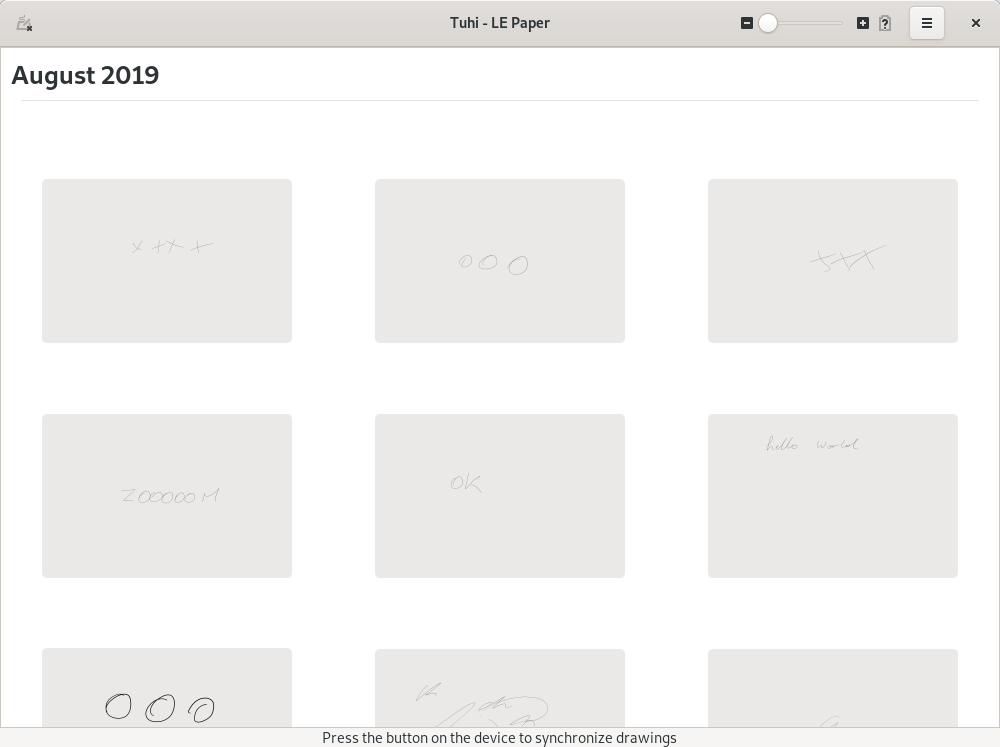
18 months ago, Benjamin Tissoires and I wrote Tuhi as a DBus session daemon. Tuhi would download the drawings from the file and make them available as JSON files over DBus to be converted to SVG or some other format by ... "clients". We wrote a simple commandline tool to debug Tuhi but no GUI, largely in the hope that maybe someone would be interested in doing that. Fast forward to now and that hasn't happened but I had some spare cycles over the last weeks so I present to you: Tuhi 0.2, now with a GTK GUI:

It's basic but also because it shouldn't do much more than just downloading the drawings and allowing you to save them. This is not an editing UI, it's effectively a file manager for the drawings on the tablet. And since by design those drawings get deleted as you download them, there isn't even much to that (don't worry, Tuhi doesn't really delete files, you can recover almost everything).

Under the hood there were some internal changes too but I suspect they'll be boring to most. The more interesting bits are reworks so we can test the conversions a lot better now and - worst case - recover files if Tuhi crashes. It is largely reverse-engineered after all.

On that note I would like to also extend my thanks to Wacom who have provided us with some of the specs for the protocol (under NDA, we cannot share these with the community, sorry). These specs helped tremendously understanding the protocol bits that were confusing at best and unknown at worst. There are still some corners in the protocol that we don't know but for the most recent generation (i.e. Intuos Pro) we should have correct parsing of the protocol.

And many thanks to Jakub Steiner for the fancy logo.

And, as of a few minutes ago, Tuhi is available as flatpak from flathub.org. For the forseeable future is is the best way to install Tuhi.

Wednesday, July 17, 2019

libinput's new thumb detection code

The average user has approximately one thumb per hand. That thumb comes in handy for a number of touchpad interactions. For example, moving the cursor with the index finger and clicking a button with the thumb. On so-called Clickpads we don't have separate buttons though. The touchpad itself acts as a button and software decides whether it's a left, right, or middle click by counting fingers and/or finger locations. Hence the need for thumb detection, because you may have two fingers on the touchpad (usually right click) but if those are the index and thumb, then really, it's just a single finger click.

libinput has had some thumb detection since the early days when we were still hand-carving bits with stone tools. But it was quite simplistic, as the old documentation illustrates: two zones on the touchpad, a touch started in the lower zone was always a thumb. Where a touch started in the upper thumb area, a timeout and movement thresholds would decide whether it was a thumb. Internally, the thumb states were, Schrödinger-esque, "NO", "YES", and "MAYBE". On top of that, we also had speed-based thumb detection - where a finger was moving fast enough, a new touch would always default to being a thumb. On the grounds that you have no business dropping fingers in the middle of a fast interaction. Such a simplistic approach worked well enough for a bunch of use-cases but failed gloriously in other cases.

Thanks to Matt Mayfields' work, we now have a much more sophisticated thumb detection algorithm. The speed detection is still there but it better accounts for pinch gestures and two-finger scrolling. The exclusion zones are still there but less final about the state of the touch, a thumb can escape that "jail" and contribute to pointer motion where necessary. The new documentation has a bit of a general overview. A requirement for well-working thumb detection however is that your device has the required (device-specific) thresholds set up. So go over to the debugging thumb thresholds documentation and start figuring out your device's thresholds.

As usual, if you notice any issues with the new code please let us know, ideally before the 1.14 release.