Wednesday, July 11, 2012

Daily tmp directory

My $HOME/tmp directory got a bit messy, especially with building test rpms or testing tarballs. My solution was to just change the directory to automatically change daily. Scripts below:
:: whot@yabbi:~> cat scripts/tmp-today 
#!/bin/bash
date=`date +%Y-%m-%d-%a`

tmpdir=$HOME/tmp/$date
tmplink=$HOME/tmp/today

if [ -e "$tmpdir" ]; then
    exit 0
fi

mkdir $tmpdir
ln -sf $tmpdir $tmplink
And the crontab entries to run this script:
0 2 * * * /home/whot/scripts/tmp-today
@reboot /home/whot/scripts/tmp-today
So run the thing at 2.00 am and on every reboot in case the box was shut off overnight. I had it on midnight first, but I think 2 am is better. If I'm still up at 2 and working, then mentally I'm still in on the day before and I don't want files to end up in different directories just because midnight clocked over. And because the laptop may be suspended overnight, we run the script on resume as well:
:: whot@yabbi:~> cat /etc/pm/sleep.d/00-tmp-dir 
#!/bin/bash

case "$1" in
 thaw|resume)
  su -c - whot /home/whot/scripts/tmp-today
  ;;
 *)
  ;;
esac
This obviously works for other directories as well, e.g. your daily download directory.

Friday, July 6, 2012

elographics touchscreen setup

This is a tutorial of sorts on how to set up an elographics serial touchscreen. I don't actually have such a device but the question pops up every couple of months. Together with Tom Munro Glass and Tias Guns, we got one working properly.

Edit: 18/09/2014 - add systemd description

A bit of history first: not too long ago, the X server was talking to serial devices directly and thus had several drivers for specific input devices. The elographics X drivers is one of them. Unfortunately, due to lack of hardware we, the upstream maintainers, can only perform cursory testing of that driver. The Linux kernel however supports a large amount of serial devices too, so for this tutorial I'll explain how to use the linux kernel to talk to the device. I'll show how to set up udev rules to use inputattach and then the X.Org evdev driver, thus making the device utilise a well-tested driver that has some client-stack support not found for the X.Org elographics driver [1].

Kernel setup

USB devices are automagically detected by the kernel and it will load the right drivers. Serial devices on the other hand require some manual configuration. Elographics devices have serial kernel drivers and inputattach can be used to hook serial devices up with those kernel drivers. First we need to load the kernel module, then call inputattach with the right options for our device:
root@localhost:~> modprobe elo
root@localhost:~> inputattach -elo /dev/ttyS0 --daemon
The path to the device may need to be changed on your box. Do look up the inputattach man page, depending on your device you may need a different flag.

Once inputattach is running, the device should be visible in /proc/bus/input/devices. You can run evtest against it and see the event stream.

udev setup pre systemd

Since we don't want to run inputattach manually each time, we'll now set up udev to run this command for us. According to Tom, the elographics device does not have a pnpid, so he configured it with a fixed device path on ttyS4:
$> cat /lib/udev/rules.d/99-elographics.rules
ACTION=="add|change", SUBSYSTEM=="tty|pnp", KERNEL=="ttyS4", \
        RUN+="/sbin/modprobe elo", \
        RUN+="/sbin/inputattach -elo /dev/%k --daemon"
If a device has a pnpid, the rule can be more flexible in what ttyS* the device needs to appear on. For example, a Wacom serial tablet may have the id WACf004 so we can use the match rule below.
$> cat /lib/udev/rules.d/99-wacom-w8001.rules
ACTION=="add|change", SUBSYSTEM=="tty|pnp", KERNEL=="ttyS[0-9]*", \
        ATTRS{id}=="WACf*", \ 
        RUN+="/sbin/modprobe wacom_w8001", \
        RUN+="/sbin/inputattach -w8001 /dev/%k --daemon"
Once this rule is in place, inputattach will be started for us at boot time (of course the device needs to be connected at boot time too). The next step is to configure X to see the device.

udev setup with systemd

Newer udev (for some value of new, we're talking about Fedora 18 or so) won't let RUN start long-running processes, such processes get killed off. If you are on system with systemd you're best off setting up a systemd service file for inputattach (see also this post). In that case, your udev rule becomes
SUBSYSTEM=="tty|pnp", KERNEL=="ttyS4",  \
      RUN+="/sbin/modprobe elo", \
      TAG+="systemd", ENV{SYSTEMD_WANTS}+="elo-inputattach@%k.service"
So we tag the device for systemd and tell it to start a servirce. The %k gets replaced with the ttySx device. The matching systemd unit file looks like this:
$> cat /etc/systemd/system/elo-inputattach@.service
[Unit]
Description=inputattach for elo serial devices

[Service]
Type=simple
ExecStart=/usr/bin/inputattach -elo /dev/%I
Once both of these are in place, a reboot will initialise inputattach, and the device is available as kernel device.

X.Org configuration

X requires the udev properties ID_INPUT and one of ID_INPUT_MOUSE, ID_INPUT_TABLET, etc. to to recognise an input device. Each of those triggers the respective MatchIsPointer, MatchIsTablet, etc. directive in the xorg.conf.d snippets. On modern systems, the udev properties should be assigned automatically [2]. If that doesn't happen on your box, you can modify the above udev rules to add it manually:
$> cat /lib/udev/rules.d/99-elographics.rules
ACTION=="add|change", SUBSYSTEM=="tty|pnp", KERNEL=="ttyS4", \
        RUN+="/sbin/modprobe elo", \
        RUN+="/sbin/inputattach -elo /dev/%k --daemon", \
        ENV{ID_INPUT}="1", ENV{ID_INPUT_TOUCHSCREEN}="1"
Once this is done, the X server will pick up the device, and the default configuration [3] will assign the evdev driver to it. Restart X, and you're done.

If you require additional options, set up an xorg.conf.d snippet. There you can add any options found in evdev(4):
$> cat /etc/X11/xorg.conf.d/99-elographics.conf
Section "InputClass"
  Identifier "elographics config"
  MatchProduct "Elo Serial TouchScreen"
  Option "EmulateThirdButton" "on"
EndSection
This snippet will match any device with the product name containing "Elo Serial Touchscreen" and enable the right button emulation feature in the evdev driver. If you are unsure about the name of your device, check /proc/bus/input/devices once inputattach is running.

X.Org configuration on Red Hat Enterprise Linux (RHEL) 6.x

This section applies to derivatives as well, e.g. CentOS 6. On RHEL 6.x, we use HAL as a configuration backend. So you will need an fdi snippet to match the device up with the driver. The snippet below is the one Tom ended up using, and it also shows the Calibration option being merged.
$> cat /etc/hal/fdi/policy/10-elographics.fdi
<?xml version="1.0" encoding="ISO-8859-1"?>
<deviceinfo version="0.2">
  <device>
    <match key="info.category" contains="input">
      <match key="info.product" contains="Elo Serial TouchScreen">
        <merge key="input.x11_driver" type="string">evdev</merge>
        <!-- next line is equivalent to an xorg.conf.d statement of
                Option "Calibration "40 4000 40 4000" -->
        <merge key="input.x11_options.calibration" type="string">40 4000
40 4000</merge>
      </match>
    </match>
  </device>
</deviceinfo>
Note the "match key" statement. Apparently, this particular device does not set "input.touchscreen", so we match on just "input" instead. Not too big a deal, since we then also match on the product name.

Once this file is in place, restart haldaemon and check with lshal that the right options are assigned. Then restart X and the device should work.

Good luck!

Many thanks to Tias and Tom for proof-reading this article multiple times.

[1] for example, evdev supports dynamic recalibration with the xinput_calibrator tool
[2] check the output of udevadm info --export-db
[3] your distribution should ship /usr/share/X11/xorg.conf.d/10-evdev.conf which assigns evdev to MatchIsTablet.

[edit 22 Feb 13: fix typo in MatchProduct name]

Thursday, June 21, 2012

XKB SlowKeys

XKB has an accessibility feature called SlowKeys. Once enabled, a key must be pressed longer than a certain timeout (default: 300ms) to register as key event. Why? From XkbGetSlowKeysDelay(3):
Some users may accidentally bump keys while moving a hand or typing stick toward the key they want. Usually, the keys that are accidentally bumped are just hit for a very short period of time. The SlowKeys control helps filter these accidental bumps by telling the server to wait a specified period, called the SlowKeys acceptance delay, before delivering key events. If the key is released before this period elapses, no key events are generated.
This is a useful feature for those that need it, but quite disturbing when it gets enabled without the user noticing. And that can happen and it then appears as if the keyboard drivers are broken (after all, a restart of the X server reverts it). So here's a what you have to do to avoid this issue:

The server has a built-in key sequence that if either shift key is held for 8 seconds, SlowKeys are enabled. Likewise, another 8s press of either shift key disables them again. This may accidentally happen when playing games or scrolling through long documents.

The server keeps two bitflags around. One for "accessibility features enabled" and one for "slow keys enabled". If the former is set, the key sequence above will activate slow keys (and thus toggle the second bit).

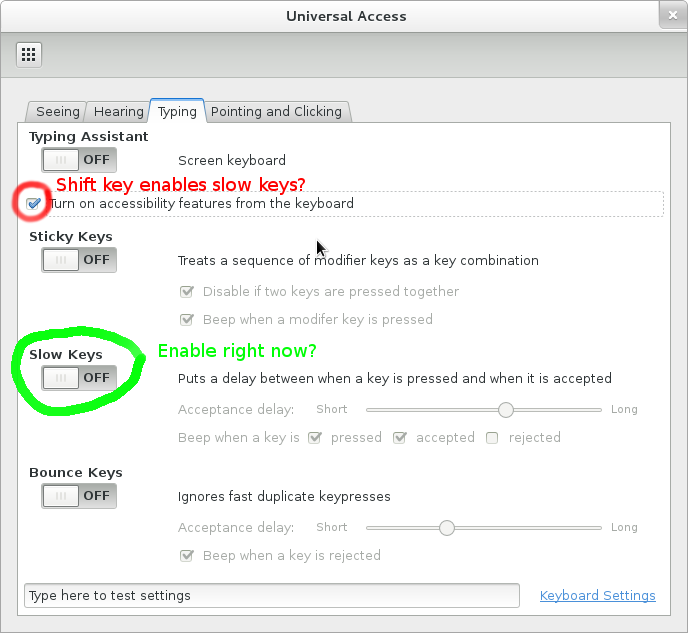
In GNOME3, you can find these options in the Universal Access panel of your System Settings:


If "Turn on accessibility features from the keyboard" is checked, holding shift will enable/disable SlowKeys. If the SlowKeys toggle is on, SlowKeys are always on.

The equivalent gsettings command (to uncheck the checkbox) is:
gsettings set org.gnome.desktop.a11y.keyboard enable false
 I recommend that if you do not need this feature, uncheck the checkbox to avoid nasty surprises. I've also added a patch to the X server to put a warning in the log if SlowKeys is enabled via the shift key. This should make future triaging a bit easier. If you see the message
(II) XKB SlowKeys are now enabled. Hold shift to disable.
in your log, you're likely better off disabling the checkbox. This patch will be in server 1.13 and server 1.12.3.
 
GNOME3 should also warn about SlowKeys being enabled but due to Bug 668213 it stopped doing so in January. Affected is GNOME 3.2+ but we're working on a fix to this.

_XkbErrCode2 macro explanation

While debugging some keyboard layout issues, I got this error:
X Error of failed request:  BadValue (integer parameter out of range for operation)
  Major opcode of failed request:  145 (XKEYBOARD)
  Minor opcode of failed request:  9 (XkbSetMap)
  Value in failed request:  0x163f0005
  Serial number of failed request:  116
  Current serial number in output stream:  122
X Errors are supposed to be useful to the client, usually denoting some error code (e.g. BadValue) and, if possible, the value that triggered it. After reading the code, I found the _XkbErrCode2 family of macros that expand to fill in the error code.
#define _XkbErrCode2(a,b) \
   ((XID)((((unsigned int)(a))<<24)|((b)&0xffffff)))
#define _XkbErrCode3(a,b,c) \
   _XkbErrCode2(a,(((unsigned int)(b))<<16)|(c))
#define _XkbErrCode4(a,b,c,d) \
   _XkbErrCode3(a,b,((((unsigned int)(c))<<8)|(d)))
Easy enough to decompose on the client though there's no indication of which decomposed representation is the correct one.
xkb/xkb.c:1742 _XkbErrCode3(0x16, i + req->firstKeySym, wire->width);
xkb/xkb.c:1749 _XkbErrCode4(0x16, i + req->firstKeySym, wire->nSyms, w);
That's when I started wondering what the 0x16 could mean - could it possibly be _XkbErrBadValue (from xkbfile.h) Bit generic, but possible. But why isn't it using the define? Looking at other _XkbErrCode calls, some were somewhat close but others were miles out. XkbBell returning _XkbErrMissingVMods? That didn't make sense.

And that's when it struck me: they didn't have any meaning. 0x16 is literally 0x16, the 22nd error code statement in this function. And, in this case also the 23rd since it is used twice. Of course, if one ever de-duplicate some of the XKB code the numbering is out. And I couldn't find a place where this is documented, so who knows how much damage we did to that approach without noticing.

Anyway, if you ever have to google for _XkbErrCode2, I'm hoping this post now comes up and explains the despair you're about to encounter.

Tuesday, June 12, 2012

XI 2.1 protocol design issues

When XI 2.1 smooth scrolling was released, we were glad to finally have a way for fluid scrolling events. Unfortunately, two design issues have since been discovered that make it harder for applications than necessary. Mea culpa, I apologise, these are things that we should have caught in the review process.

Scrolling may overflow the axis range

Scrolling events are now posted through axes marked as scrolling axes. This means they're limited to the 32.32 fixed point value range that valuators can take. That range matters because despite scrolling being relative, coordinates in XIDeviceEvents must always be absolute values. Scrolling down is more common than scrolling up, so the axis will slowly accumulate until it reaches the maximum range. We have to reset them to 0 once we reach INT_MAX to avoid overflow so at some point you may see a scrolling event that jumps from something that's close to 232 to 0. You can at this point assume that this was not a valid scroll event. This is a rather theoretical case, overflowing this range requires a lot of scrolling, even on touchpads with a higher scroll increment.

The first scroll event has no usable scroll information

This is a more significant issue. The smooth scrolling information is part of the valuator data, but axis data is only sent in some events, and then only to some clients. Once a pointer leaves the window, the original client loses track of what happens to the valuators. Once the pointer re-enters the client's window it will receive the new axis value once more scrolling happens. That value is an absolute value but clients need the delta between it and the previous scroll event. That information is only available once the second event is sent to the client.

For example, the axis data may be 3000 when the pointer leaves the window. Then the pointer re-enters the window and the first scroll event sends has a value of 5500. Since we don't know how much the axis increased elsewhere, we cannot act on this scroll event, we have to wait for the next one to calculate a delta.

I confirmed with Carlos that this is indeed what GTK does: reset the scroll valuators on enter and then track the valuators for future events.

Tuesday, June 5, 2012

git branch-info

I have too many branches. And sometimes I forgot which one is which. So yesterday I sat down and wrote a git alias to tell me:
branch-info = "!sh -c 'git branch --list --no-color | \
    sed -e \"s/*/ /\" | \
    while read branch; do \
    git log -1 --format=format:\"%Cred$branch:%Cblue %s %Cgreen%h%Creset (%ar)\" $branch; \
    done'"
Gives me a nice output like this:
:: whot@yabbi:~/xorg/xserver (for-keith)> git branch-info
dtrace-input-abi:  dix: add dtrace probes to input API  c0b0a9b (3 months ago)
extmod-changes:  DRI2: Remove prototype for DRI2DestroyDrawable  8ba2980 (11 months ago)
fedora-17-branch:  os: make timers signal-safe 7089841 (6 weeks ago)
master:  Xext: include dix-config.h 594b4a4(12 days ago)
mt-devel: Switch to new listener handling for touch events 3ee84fc (6 months ago)
mt-devel2: dix: conditionally update the cursor sprite 9edb3fd(6 months ago)
multitouch: blah 8ecec2e(4 months ago)
...
Or, the same thing aligned in columns, though without colours (column doesn't parse the escape sequences for colors so the columns are misaligned).
branch-info = "!sh -c 'git branch --list --no-color | \
    sed -e \"s/*/ /\" | \
    while read branch; do \
    git log -1 --format=format:\"$branch:|%s|%h|%ar\n\" $branch; done | \
    column -t -s\"|\"'"

pkg-config and empty CFLAGS

I ran into this a few days ago and it took me a while to find. One of the gnome modules failed to build with an error of "cannot find <gtk/gtk.h>". At first I thought it was a Makefile.am/configure.ac error but it appears the issue sits deeper. Cause of the problem was a stale gtk installation, but finding that was tricky. The configure.ac file contains essentially
PKG_CHECK_MODULES(GTK, gtk+-2.0)
AC_SUBST(GTK_CFLAGS)
AC_SUBST(GTK_LIBS)
Turns out that PKG_CHECK_MODULES in configure.ac gets translated to
pkg-config --exists --print-errors gtk+-2.0
This returns 0 (success) on my machine - the gtk+-2.0.pc file is there. However, to get the CFLAGS, configure runs a different command and that returned an error:
$> pkg-config --cflags gtk+-2.0
Package libpng12 was not found in the pkg-config search path.
Perhaps you should add the directory containing `libpng12.pc'
to the PKG_CONFIG_PATH environment variable
Package 'libpng12', required by 'GdkPixbuf', not found
Alas, this error isn't shown anywhere and it doesn't end up in the log either. What does happen though is that GTK_CFLAGS gets replaced with an empty string, causing the build error above. Once I installed the required libpng everything works fine. But if you ever run into issues where the CFLAGS aren't quite what they should be, check the pkg-config commands for success.

[Update Jun 07 2012]
As pointed out in the comments, looks like we're looking at https://bugs.freedesktop.org/show_bug.cgi?id=4738 and https://bugs.freedesktop.org/show_bug.cgi?id=43149 here.